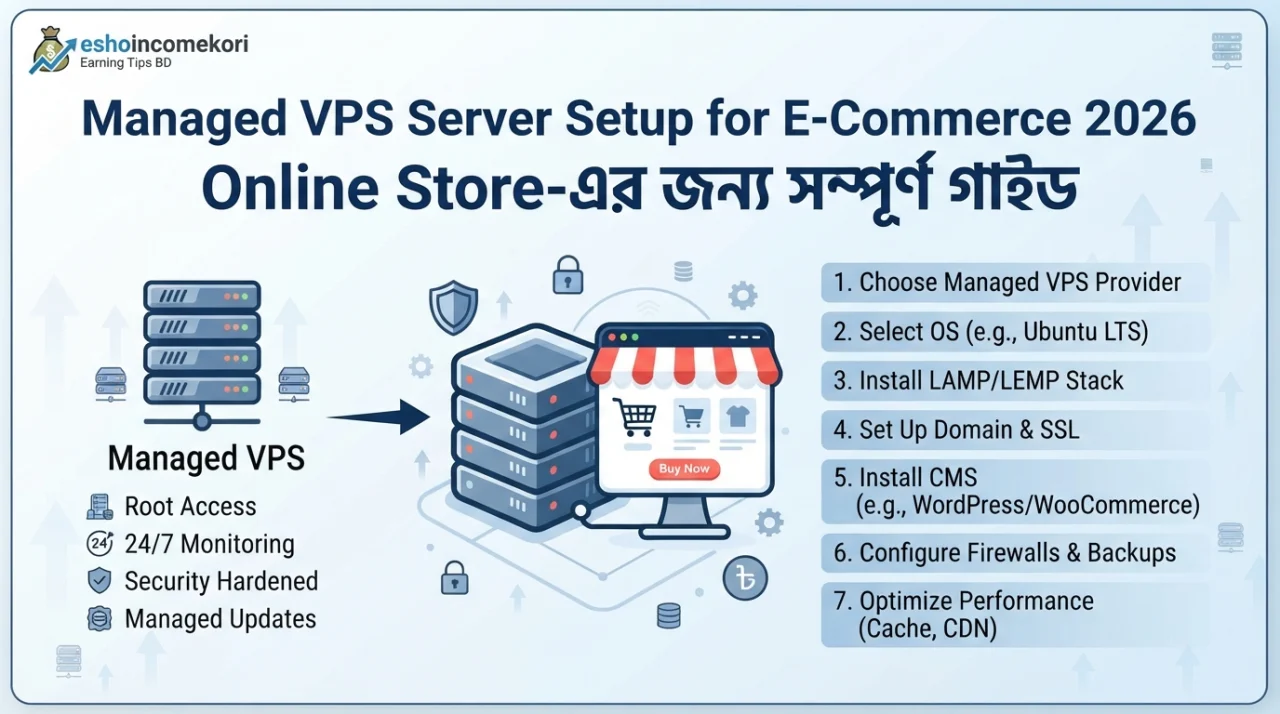
Managed VPS Server Setup for E-Commerce 2026 – Online Store-এর জন্য সম্পূর্ণ গাইড
Managed VPS Server Setup for E-Commerce 2026 – VPS Configuration, Security & Performance Guide Managed VPS Server Setup for E-Commerce 2026 সম্পর্কে জানুন। VPS configuration, server security, SSL, database, backup, performance ও scalability গাইড।
Introduction
একটি e-commerce website ছোট অবস্থায় shared hosting-এ ভালোভাবে চললেও customer, product, order এবং traffic বাড়ার সঙ্গে সঙ্গে hosting requirement দ্রুত পরিবর্তিত হয়। বিশেষ করে sale campaign, seasonal traffic বা promotional event-এর সময় server-এর ওপর হঠাৎ অতিরিক্ত load পড়তে পারে।
এই পরিস্থিতিতে Managed VPS Server একটি practical hosting solution হতে পারে। VPS-এর dedicated/allocated resources এবং managed service-এর কারণে business owner-কে সব server administration নিজে করতে হয় না।
তবে e-commerce-এর জন্য VPS setup শুধু server কিনে WordPress install করার বিষয় নয়। Server resources, operating system, database, caching, SSL, firewall, backup, monitoring এবং scalability—সবকিছু পরিকল্পনা করে configure করতে হয়।
এই Managed VPS Server Setup for E-Commerce 2026 guide-এ একটি online store-এর জন্য VPS নির্বাচন থেকে শুরু করে security, performance optimization, backup এবং maintenance পর্যন্ত গুরুত্বপূর্ণ বিষয়গুলো সহজভাবে আলোচনা করা হলো।
গুরুত্বপূর্ণ: VPS provider, control panel, operating system এবং e-commerce platform অনুযায়ী exact configuration পরিবর্তিত হবে। Production website-এ server changes করার আগে backup এবং testing environment রাখা ভালো।
Managed VPS কী?
VPS বা Virtual Private Server হলো একটি virtualized server environment যেখানে একটি physical server-এর resources একাধিক virtual server-এর মধ্যে allocated থাকে।
Managed VPS-এর ক্ষেত্রে hosting provider সাধারণত server management-এর কিছু গুরুত্বপূর্ণ কাজ handle করে।
এর মধ্যে থাকতে পারে:
- Server setup
- OS maintenance
- Security updates
- Monitoring
- Technical support
- Backup-related services
Exact service provider অনুযায়ী আলাদা হতে পারে।
E-Commerce-এর জন্য Managed VPS কেন?
Online store-এর জন্য VPS বিবেচনা করার প্রধান কারণ:
- Better resource allocation
- Improved performance potential
- Greater control
- Scalability
- More predictable server environment
বিশেষ করে product এবং order database বড় হলে VPS useful হতে পারে।
Shared Hosting থেকে কখন VPS-এ যাবেন?
নিচের লক্ষণগুলো দেখা দিলে VPS বিবেচনা করা যেতে পারে:
- Frequent server slowdown
- High CPU usage
- RAM shortage
- Database performance সমস্যা
- Traffic spikes
- Too many concurrent users
- Hosting resource limit
- Checkout page slow
তবে migration-এর আগে performance data analyse করুন।
Step 1: VPS Resource নির্বাচন
E-commerce VPS-এর resource website workload অনুযায়ী নির্বাচন করতে হবে।
মূল বিষয়:
CPU
Concurrent requests এবং application processing-এর জন্য CPU গুরুত্বপূর্ণ।
RAM
Database, PHP/application processes এবং caching-এর জন্য RAM প্রয়োজন।
Storage
Product images, database, backups এবং application files-এর জন্য পর্যাপ্ত storage দরকার।
Bandwidth
Monthly visitor এবং file transfer অনুযায়ী bandwidth প্রয়োজন।
একটি Starting Configuration
ছোট/মাঝারি e-commerce website-এর জন্য একটি সম্ভাব্য starting configuration হতে পারে:
- 2–4 vCPU
- 4–8 GB RAM
- SSD/NVMe storage
- Adequate bandwidth
- Linux server
এটি universal recommendation নয়। Actual requirement traffic, WooCommerce configuration, database size এবং caching-এর ওপর নির্ভর করবে।
Step 2: Operating System
Linux VPS e-commerce hosting-এর জন্য জনপ্রিয়।
Common choices:
- Ubuntu
- Debian
- AlmaLinux
- Rocky Linux
Provider-এর supported OS এবং আপনার technical stack অনুযায়ী নির্বাচন করুন।
Managed VPS হলে provider-এর recommended OS ব্যবহার করা সহজ হতে পারে।
Step 3: Web Server
E-commerce website-এর জন্য web server performance গুরুত্বপূর্ণ।
Popular options:
- Nginx
- Apache
- LiteSpeed
আপনার CMS এবং hosting provider-এর support অনুযায়ী web server নির্বাচন করুন।
Step 4: PHP Configuration
WooCommerce বা PHP-based e-commerce website-এর জন্য PHP configuration গুরুত্বপূর্ণ।
Optimize করতে হবে:
- PHP version
- Memory limit
- Execution time
- Upload size
- OPcache
পুরোনো PHP version ব্যবহার না করে supported stable version ব্যবহার করুন।
Step 5: Database Setup
WordPress/WooCommerce সাধারণত MySQL বা MariaDB ব্যবহার করে।
Database optimization-এর মধ্যে থাকতে পারে:
- Proper indexes
- Query optimization
- Database cleanup
- Slow query monitoring
- Regular backups
অপ্রয়োজনীয় plugins বা bloated tables database performance কমাতে পারে।
Step 6: SSL/HTTPS
E-commerce website-এ HTTPS অত্যন্ত গুরুত্বপূর্ণ।
SSL/TLS configure করে:
http:// → https://
redirect করতে হবে।
HTTPS ব্যবহার করলে customer ও server-এর মধ্যে data transmission encrypted হয়।
Payment-related pages-এ secure connection বিশেষভাবে গুরুত্বপূর্ণ।
Step 7: Firewall
VPS-এর জন্য firewall configure করা উচিত।
প্রয়োজন অনুযায়ী allow করুন:
- HTTP
- HTTPS
- SSH
- Required application ports
Unused ports বন্ধ রাখুন।
Step 8: SSH Security
Default SSH configuration harden করা ভালো।
Recommended:
- SSH key authentication
- Strong credentials
- Root login restriction যেখানে appropriate
- Fail2ban বা equivalent protection
- Limited SSH access
Server management ভুলভাবে configure করলে administrator নিজেই access হারাতে পারেন। তাই changes carefully test করুন।
Step 9: E-Commerce Platform Install
VPS environment ready হলে e-commerce platform install করুন।
Popular options:
- WooCommerce
- Magento/Adobe Commerce
- PrestaShop
- OpenCart
- Custom e-commerce application
Platform অনুযায়ী server requirements ভিন্ন হতে পারে।
WooCommerce VPS Setup
WordPress + WooCommerce ব্যবহার করলে প্রয়োজন:
Linux → Web Server → PHP → Database → WordPress → WooCommerce
এর ওপর caching এবং security layer যোগ করা যায়।
Step 10: Caching Setup
Caching website performance significantly improve করতে পারে।
Possible layers:
- Browser cache
- Page cache
- Object cache
- OPcache
- CDN cache
তবে e-commerce website-এ caching carefully configure করতে হয়।
Cart, checkout এবং customer-specific pages ভুলভাবে cache করলে serious সমস্যা হতে পারে।
Redis/Object Cache
Database query এবং repeated data access দ্রুত করতে object caching ব্যবহার করা যেতে পারে।
Redis-এর মতো caching system WooCommerce performance improve করতে সহায়ক হতে পারে, বিশেষ করে বড় database বা high-traffic environment-এ।
CDN ব্যবহার
International audience থাকলে CDN useful হতে পারে।
CDN static files:
- Images
- CSS
- JavaScript
- Fonts
দ্রুত deliver করতে সাহায্য করতে পারে।
বাংলাদেশ-focused store-এর ক্ষেত্রেও CDN ব্যবহার করা যেতে পারে, depending on audience and infrastructure.
Image Optimization
E-commerce website-এর product images অনেক বেশি storage ও bandwidth ব্যবহার করতে পারে।
Optimization:
- WebP/AVIF
- Image compression
- Proper dimensions
- Lazy loading
- Responsive images
ব্যবহার করলে page load time কমাতে সাহায্য করতে পারে।
Database Optimization
Online store-এর database-এ সাধারণত:
- Products
- Orders
- Customers
- Sessions
- Inventory
এর মতো data থাকে।
Database clean এবং optimized রাখা গুরুত্বপূর্ণ।
অপ্রয়োজনীয়:
- Revisions
- Transients
- Logs
- Spam data
নিয়মিত clean করা যেতে পারে।
Backup Strategy
E-commerce website-এর ক্ষেত্রে backup অত্যন্ত গুরুত্বপূর্ণ।
Recommended:
Daily automated backup + Off-site backup
Backup রাখতে পারেন:
- Website files
- Database
- Configuration
- Media
শুধু server-এর একই disk-এ backup রাখা যথেষ্ট নয়।
Disaster Recovery
Server failure হলে দ্রুত website restore করার পরিকল্পনা থাকা উচিত।
একটি recovery plan-এ থাকতে পারে:
- Backup location
- Restore procedure
- DNS recovery
- SSL configuration
- Database restoration
- Application testing
Regular restore test না করলে backup কাজ করবে কিনা নিশ্চিত হওয়া যায় না।
Server Monitoring
Managed VPS provider monitoring দিতে পারে। তারপরও application-level monitoring রাখা ভালো।
Monitor করুন:
- CPU
- RAM
- Disk usage
- Network
- Database
- PHP workers
- Response time
- Error logs
E-Commerce Security
Online store-এ security priority হওয়া উচিত।
Security checklist:
- HTTPS
- Strong admin password
- 2FA
- Updated CMS
- Updated plugins
- Firewall
- Malware monitoring
- Secure backups
- Limited admin access
Payment information unnecessarily server-এ store না করাই ভালো।
DDoS Protection
High-profile e-commerce website DDoS attack-এর target হতে পারে।
CDN/WAF এবং provider-level DDoS mitigation ব্যবহার করা যেতে পারে।
তবে DDoS protection কোনো single-layer solution নয়।
Payment Gateway Security
Payment gateway integrate করার সময় gateway provider-এর official integration method অনুসরণ করুন।
Sensitive payment credentials বা card information নিজের database-এ unnecessarily store করবেন না।
PCI-related requirements applicable হলে সেগুলোও বিবেচনা করুন।
Managed VPS-এর সুবিধা
1. Technical Workload কম
Provider server administration-এর কিছু কাজ handle করতে পারে।
2. Better Performance
Dedicated/allocated resources shared hosting-এর তুলনায় বেশি predictable হতে পারে।
3. Scalability
Traffic বাড়লে resources upgrade করা যায়।
4. Security Support
Provider-level monitoring ও maintenance পাওয়া যেতে পারে।
5. Business Focus
Business owner server administration-এর পরিবর্তে sales ও marketing-এ বেশি focus করতে পারেন।
Managed VPS-এর অসুবিধা
- Shared hosting-এর চেয়ে বেশি cost
- Provider-এর ওপর dependency
- কিছু configuration limitation থাকতে পারে
- High-end VPS-এর monthly cost বেশি হতে পারে
E-Commerce VPS Cost
Managed VPS pricing provider এবং resources অনুযায়ী পরিবর্তিত হয়।
Cost নির্ভর করতে পারে:
- CPU
- RAM
- Storage
- Bandwidth
- Backup
- Management
- Control panel
- Security
- Data center location
Monthly hosting cost-এর পাশাপাশি setup এবং add-on fees-ও বিবেচনা করুন।
VPS Performance Optimization Checklist
- Enable OPcache
- Use proper PHP version
- Configure page caching
- Add object caching
- Optimize database
- Compress images
- Use CDN
- Remove unnecessary plugins
- Monitor CPU/RAM
- Optimize queries
Common Mistakes
শুধু বেশি RAM কিনলেই Performance বাড়বে ভাবা
CPU, database, PHP এবং application optimization-ও গুরুত্বপূর্ণ।
Checkout Cache করা
Customer-specific pages cache করলে order/cart সমস্যা হতে পারে।
Backup একই Server-এ রাখা
Server failure হলে backup-ও হারিয়ে যেতে পারে।
Security Updates Ignore করা
Outdated software attack surface বাড়ায়।
Overprovisioning
Traffic requirement না বুঝে expensive VPS নেওয়া unnecessary হতে পারে।
আরও পড়ুন
This app is making people rich ২০২৬ সালের ভাইরাল অ্যাপ ট্রেন্ড ও বাস্তব বিশ্লেষণ
How to Earn from Affiliate Marketing: ২০২৬ সালে Affiliate Marketing থেকে Income করার সম্পূর্ণ গাইড
Best AI Tools for Beginners 2026: Complete Guide to Start Using Artificial Intelligence
AI Tools for Productivity: ২০২৬ সালে কাজের গতি ও দক্ষতা বাড়ানোর সেরা AI টুলস
FAQ
Managed VPS কী?
VPS hosting যেখানে provider server management-এর কিছু গুরুত্বপূর্ণ কাজ handle করে।
E-commerce-এর জন্য VPS কেন দরকার?
Traffic, database এবং resource requirement বাড়লে VPS better resource allocation ও control দিতে পারে।
WooCommerce-এর জন্য VPS ভালো?
Medium বা high-resource WooCommerce website-এর জন্য VPS useful হতে পারে।
কত RAM দরকার?
Website traffic, plugins, database এবং concurrent users অনুযায়ী RAM নির্বাচন করতে হবে।
4GB RAM কি যথেষ্ট?
ছোট বা optimized website-এর জন্য 4GB RAM যথেষ্ট হতে পারে, তবে exact requirement workload-এর ওপর নির্ভর করে।
Managed VPS কি beginners ব্যবহার করতে পারে?
হ্যাঁ। Managed service technical workload কমাতে পারে।
VPS-এ SSL দরকার?
অবশ্যই। E-commerce website-এর জন্য HTTPS essential।
VPS-এ backup রাখা প্রয়োজন?
হ্যাঁ। বিশেষ করে e-commerce website-এর order ও customer data-এর জন্য regular off-site backup অত্যন্ত গুরুত্বপূর্ণ।
CDN কি e-commerce website-এর জন্য দরকার?
সব website-এর জন্য mandatory নয়, তবে image-heavy বা geographically distributed audience-এর ক্ষেত্রে CDN performance improve করতে পারে।
WooCommerce VPS-এ Redis কেন ব্যবহার করা হয়?
Repeated database/object data দ্রুত access করতে object caching হিসেবে Redis ব্যবহার করা যেতে পারে।
Managed VPS কি shared hosting-এর চেয়ে দ্রুত?
অনেক ক্ষেত্রে বেশি predictable resources-এর কারণে performance ভালো হতে পারে, তবে actual speed configuration ও optimization-এর ওপর নির্ভর করে।
E-commerce VPS-এর সবচেয়ে গুরুত্বপূর্ণ security measure কী?
একটি single measure নয়; HTTPS, updates, firewall, 2FA, secure credentials, monitoring এবং backup—সবগুলো layered security-এর অংশ।
Conclusion
Managed VPS Server Setup for E-Commerce 2026 করার সময় শুধু server resource নির্বাচন করাই যথেষ্ট নয়। একটি successful online store-এর জন্য server, database, application, caching, security এবং backup—সবকিছু coordinatedভাবে configure করতে হয়।
ছোট website-এর জন্য shared hosting যথেষ্ট হতে পারে। কিন্তু traffic, products, orders এবং concurrent users বাড়লে managed VPS একটি শক্তিশালী upgrade option হতে পারে।
E-commerce website-এর জন্য বিশেষভাবে SSL, firewall, regular security updates, database optimization, caching, CDN এবং off-site backup গুরুত্ব দিয়ে configure করুন।
সবশেষে, VPS plan নির্বাচন করার আগে আপনার বর্তমান traffic ও resource usage analyse করুন। প্রয়োজন অনুযায়ী শুরু করুন এবং business growth-এর সঙ্গে resources scale করুন। এতে unnecessary hosting cost কম রেখে performance ও reliability-এর মধ্যে ভালো balance তৈরি করা সম্ভব হবে।
About the Author