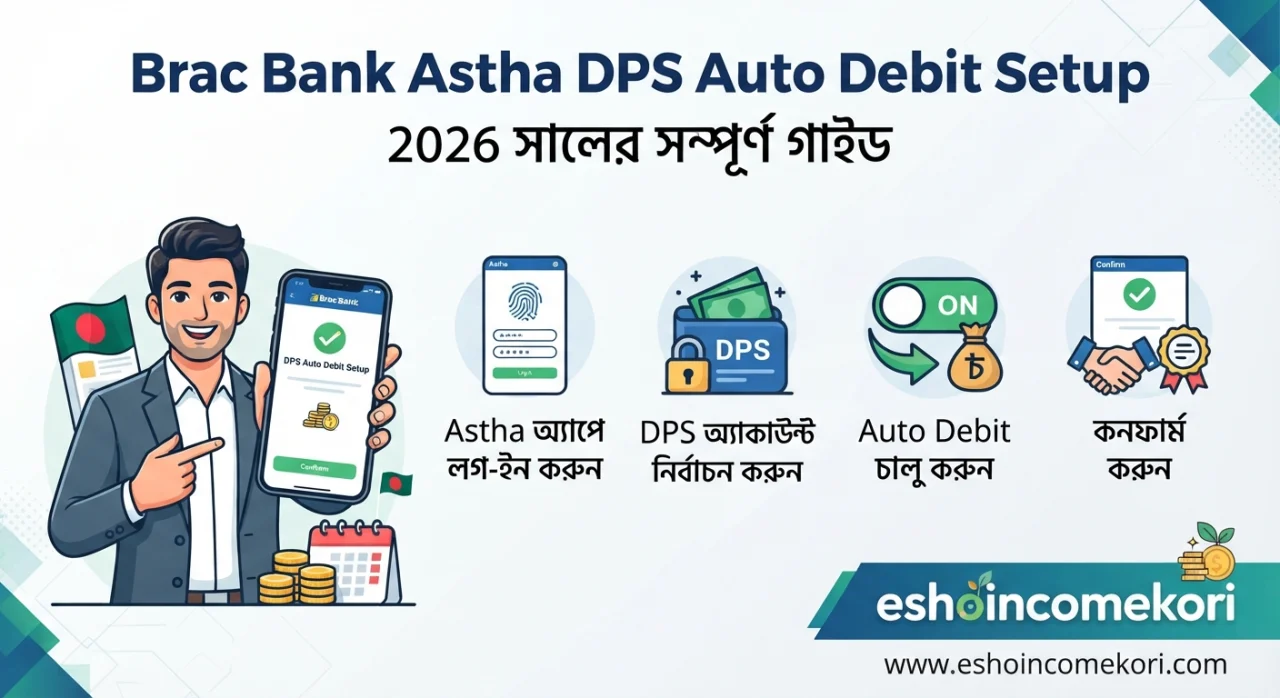
Brac Bank Astha DPS Auto Debit Setup: 2026 সালের সম্পূর্ণ গাইড
Brac Bank Astha DPS Auto Debit Setup সম্পর্কে জানুন। Astha App দিয়ে DPS auto debit চালু, payment schedule, account balance ও common সমস্যা সমাধানের নিয়ম দেখুন।
Introduction
বর্তমানে নিয়মিত savings করার জন্য DPS একটি জনপ্রিয় পদ্ধতি। কিন্তু প্রতি মাসে নির্দিষ্ট তারিখে DPS installment manually জমা দেওয়া অনেকের জন্য ঝামেলার হতে পারে। কোনো মাসে payment date ভুলে গেলে বা account-এ পর্যাপ্ত balance না থাকলে installment নিয়ে সমস্যা তৈরি হতে পারে।
BRAC Bank Astha DPS Auto Debit Setup এই জায়গায় বেশ কাজে আসে। Auto debit সুবিধা ব্যবহার করলে নির্ধারিত account থেকে DPS installment স্বয়ংক্রিয়ভাবে debit করার ব্যবস্থা করা যায়। ফলে প্রতি মাসে আলাদাভাবে payment করার প্রয়োজন কমে।
তবে Astha App-এ DPS খোলা, auto debit instruction, account balance, installment date এবং failed debit-এর নিয়ম আলাদা বিষয়। তাই setup করার আগে পুরো process বোঝা গুরুত্বপূর্ণ।
Quick Summary
| বিষয় | তথ্য |
|---|---|
| Bank | BRAC Bank PLC |
| Digital Platform | Astha |
| DPS | Deposit Pension Scheme |
| Auto Debit | নির্ধারিত account থেকে installment debit |
| প্রয়োজন | Eligible BRAC Bank account |
| Main Concern | Payment date-এ sufficient balance |
| App | Astha |
| Benefit | Manual payment-এর প্রয়োজন কমে |
| Risk | Insufficient balance হলে debit fail হতে পারে |
BRAC Bank Astha কী?
Astha হলো BRAC Bank-এর digital banking platform, যার মাধ্যমে গ্রাহক বিভিন্ন banking service পরিচালনা করতে পারেন।
Astha-এর মাধ্যমে account balance দেখা, fund transfer, bill payment এবং অন্যান্য digital banking service ব্যবহার করা যায়।
DPS-এর মতো recurring savings product manage করার ক্ষেত্রে digital banking সুবিধা customer-এর জন্য payment ও account monitoring সহজ করে।
DPS Auto Debit কী?
Auto debit হলো এমন একটি arrangement যেখানে নির্ধারিত তারিখে আপনার linked bank account থেকে DPS installment automatically debit করার instruction থাকে।
ধরা যাক, আপনার মাসিক DPS installment:
৳5,000
এবং debit date:
প্রতি মাসের 10 তারিখ
তাহলে নির্ধারিত তারিখে account-এ প্রয়োজনীয় balance থাকলে installment automatically debit হওয়ার ব্যবস্থা থাকতে পারে।
এতে প্রতি মাসে manual transfer করার প্রয়োজন কমে যায়।
BRAC Bank Astha DPS Auto Debit Setup কীভাবে করবেন?
Digital banking interface সময়ের সঙ্গে পরিবর্তিত হতে পারে। তাই আপনার Astha App-এর current menu name কিছুটা আলাদা হতে পারে।
Step 1: Astha App Open করুন
প্রথমে BRAC Bank-এর official Astha App খুলুন।
আপনার registered credentials দিয়ে login করুন।
Security-এর জন্য OTP, PIN বা biometric authentication প্রয়োজন হতে পারে।
Step 2: DPS/Savings Section খুঁজুন
Login করার পর deposit, DPS, savings অথবা relevant banking section-এ যান।
আপনার existing DPS থাকলে সেটি select করুন।
নতুন DPS হলে আগে applicable DPS product ও terms দেখে account open করতে হবে।
Step 3: Auto Debit Option Check করুন
DPS details-এর মধ্যে auto debit, standing instruction বা recurring payment-এর মতো option available আছে কি না দেখুন।
সব DPS product বা account-এর ক্ষেত্রে একই option নাও থাকতে পারে।
Step 4: Debit Account নির্বাচন করুন
যে BRAC Bank account থেকে monthly installment কাটা হবে সেটি select করতে হতে পারে।
নিশ্চিত করুন:
Account active আছে
Account আপনার নামে/eligible profile-এর সঙ্গে linked
Payment date-এ sufficient balance থাকবে
Step 5: Payment Amount ও Date Verify করুন
Auto debit instruction confirm করার আগে DPS installment amount এবং debit date ভালোভাবে check করুন।
উদাহরণ:
Monthly Installment: ৳3,000
Debit Date: 15th
Duration: 5 years
Information ভুল হলে পরে correction-এর প্রয়োজন হতে পারে।
Step 6: Confirmation দিন
Required authentication সম্পন্ন করে instruction confirm করুন।
Confirmation screen বা transaction/reference information থাকলে screenshot বা digital record সংরক্ষণ করা ভালো।
Auto Debit-এর জন্য Account-এ কত টাকা রাখতে হবে?
সবচেয়ে গুরুত্বপূর্ণ বিষয় হলো debit date-এর আগে account-এ পর্যাপ্ত balance রাখা।
ধরা যাক:
Monthly DPS = ৳5,000
তাহলে payment date-এর আগে অন্তত ৳5,000 available balance থাকা উচিত।
তবে account থেকে অন্য কোনো charge, standing instruction বা transaction একই সময়ে debit হওয়ার সম্ভাবনা থাকলে অতিরিক্ত buffer রাখা নিরাপদ।
উদাহরণ:
DPS installment = ৳5,000
Possible other charge = ৳100
Recommended available balance = ৳5,100 বা তার বেশি
এটি কোনো universal bank rule নয়; practical budgeting-এর জন্য একটি example।
Auto Debit Failed হলে কী হতে পারে?
Account-এ sufficient balance না থাকলে scheduled debit fail হতে পারে।
এর ফলে:
DPS installment unpaid থাকতে পারে
Late payment-related consequence হতে পারে
DPS-এর terms অনুযায়ী penalty/adjustment হতে পারে
Future maturity calculation প্রভাবিত হতে পারে
Exact consequence আপনার DPS product-এর terms এবং bank-এর applicable policy-এর ওপর নির্ভর করবে।
তাই failed debit হলে দ্রুত BRAC Bank-এর সঙ্গে যোগাযোগ করা ভালো।
Astha App-এ DPS Payment Check
Auto debit setup করার পর payment হয়েছে কি না তা regularly check করুন।
সাধারণত transaction history বা account statement থেকে দেখতে পারেন:
Debit amount
Transaction date
Reference
Remaining balance
DPS-related transaction
কোনো payment missing মনে হলে একই installment দ্বিতীয়বার manually pay করার আগে bank record verify করুন।
Auto Debit বন্ধ করতে চাইলে কী করবেন?
আপনি যদি future installment-এর auto debit arrangement পরিবর্তন বা বন্ধ করতে চান, তাহলে Astha App-এ available option থাকলে সেখান থেকে instruction management করতে পারেন।
যদি option না পাওয়া যায়, BRAC Bank-এর official support বা branch-এর মাধ্যমে standing instruction/auto debit cancellation-এর process জেনে নিতে হবে।
বিশেষ করে cancellation করার আগে নিশ্চিত করুন যে আপনার DPS-এর future installments কীভাবে payment করবেন।
DPS Auto Debit-এর সুবিধা
১. Payment Miss হওয়ার সম্ভাবনা কম
নির্দিষ্ট তারিখে automatic debit হলে manually payment করার প্রয়োজন কমে।
২. Regular Savings Habit তৈরি হয়
প্রতি মাসে টাকা automatically savings-এ চলে যাওয়ায় disciplined saving করা সহজ হয়।
৩. সময় বাঁচে
প্রতি মাসে app খুলে আলাদাভাবে payment করার ঝামেলা কমে।
৪. Busy People-এর জন্য সুবিধাজনক
চাকরি, business বা freelancing-এর ব্যস্ততার কারণে payment date ভুলে যাওয়ার সম্ভাবনা কমে।
৫. Digital Monitoring
Astha-এর মতো digital banking platform ব্যবহার করে account transaction monitor করা সহজ হয়।
Auto Debit-এর অসুবিধা
Insufficient Balance
Payment date-এ balance না থাকলে debit fail হতে পারে।
Cash Flow Planning প্রয়োজন
একাধিক recurring payment থাকলে মাসের নির্দিষ্ট সময়ে account balance কমে যেতে পারে।
ভুল Instruction
ভুল account, amount বা date সেট করলে সমস্যা তৈরি হতে পারে।
Cancellation Tracking
Auto debit বন্ধ করার পরও instruction properly cancelled হয়েছে কি না নিশ্চিত করা প্রয়োজন।
DPS Auto Debit বনাম Manual Payment
| বিষয় | Auto Debit | Manual Payment |
|---|---|---|
| Payment Method | Automatic | নিজে করতে হয় |
| Time | কম লাগে | বেশি লাগে |
| Missed Payment Risk | তুলনামূলক কম | বেশি |
| Balance Requirement | নির্ধারিত date-এ প্রয়োজন | Payment করার সময় প্রয়োজন |
| Control | Scheduled | প্রতিবার manual |
| Convenience | বেশি | তুলনামূলক কম |
Auto Debit Setup করার আগে Checklist
Personal Information
Astha profile-এর mobile number ও other information updated আছে কি না দেখুন।
Account Status
Debit account active কি না যাচাই করুন।
DPS Details
Monthly installment এবং maturity period confirm করুন।
Payment Date
প্রতি মাসে কোন তারিখে installment debit হবে তা জেনে রাখুন।
Balance
Debit date-এর আগে sufficient balance রাখুন।
Notification
SMS/app notification চালু থাকলে transaction monitoring সহজ হয়।
Common Mistakes
Payment Date ভুলে যাওয়া
Auto debit থাকলেও account balance monitoring করা প্রয়োজন।
Exact Installment Amount না জানা
DPS amount পরিবর্তন হলে পুরোনো amount ধরে account balance রাখা ঠিক নয়।
অন্য Payment একই দিনে রাখা
Salary account থেকে একই সময়ে loan EMI, card payment ও DPS debit হলে cash-flow problem হতে পারে।
Failed Debit Ignore করা
একটি installment fail হলে বিষয়টি দীর্ঘদিন ignore না করে bank-এর সঙ্গে যোগাযোগ করুন।
Duplicate Payment
Auto debit হয়েছে কি না না দেখে manually একই installment আবার payment করলে duplicate transaction হতে পারে।
Expert Tips
১. DPS debit date-এর ১–২ দিন আগে account balance check করুন।
২. Account-এ minimum required amount-এর চেয়ে কিছু বেশি balance রাখুন।
৩. Astha notification চালু রাখুন।
৪. Monthly statement review করুন।
৫. Auto debit setup-এর confirmation record রাখুন।
৬. DPS installment পরিবর্তন হলে নতুন amount confirm করুন।
৭. Bank account থেকে অন্য recurring payment থাকলে একটি monthly cash-flow plan তৈরি করুন।
৮. Auto debit fail হলে দ্রুত bank support-এ যোগাযোগ করুন।
৯. DPS maturity-এর আগে terms ও expected maturity amount review করুন।
১০. কোনো third-party ব্যক্তি বা unofficial link-এর মাধ্যমে banking credentials দেবেন না।
আরও পড়ুন
This app is making people rich ২০২৬ সালের ভাইরাল অ্যাপ ট্রেন্ড ও বাস্তব বিশ্লেষণ
How to Earn from Affiliate Marketing: ২০২৬ সালে Affiliate Marketing থেকে Income করার সম্পূর্ণ গাইড
Best AI Tools for Beginners 2026: Complete Guide to Start Using Artificial Intelligence
AI Tools for Productivity: ২০২৬ সালে কাজের গতি ও দক্ষতা বাড়ানোর সেরা AI টুলস
Frequently Asked Questions
১. BRAC Bank Astha দিয়ে DPS manage করা যায়?
Astha BRAC Bank-এর digital banking platform। আপনার eligible DPS/product-এর available digital features অনুযায়ী account বা deposit-related service manage করা যেতে পারে।
২. Astha DPS Auto Debit কী?
এটি নির্ধারিত bank account থেকে DPS installment automatically debit করার arrangement।
৩. Auto debit-এর জন্য account-এ balance রাখা জরুরি?
হ্যাঁ। Scheduled debit সফল হওয়ার জন্য পর্যাপ্ত available balance থাকা প্রয়োজন।
৪. Balance না থাকলে কী হবে?
Debit fail হতে পারে এবং product terms অনুযায়ী unpaid installment বা অন্যান্য consequence হতে পারে।
৫. Auto debit কি সব DPS-এর জন্য available?
সব product-এর feature একই নয়। আপনার নির্দিষ্ট DPS-এর current terms ও Astha App-এর available option যাচাই করুন।
৬. Auto debit বন্ধ করা যায়?
প্রযোজ্য ক্ষেত্রে instruction cancellation করা যেতে পারে। App-এ option না থাকলে bank-এর official support/branch থেকে process জানতে হবে।
৭. Auto debit setup করার পর manual payment করা যাবে?
Duplicate payment এড়াতে আগে scheduled debit status check করা উচিত।
৮. DPS installment date পরিবর্তন করা যায়?
এটি নির্দিষ্ট DPS product-এর terms-এর ওপর নির্ভর করে। Bank-এর current policy অনুযায়ী request করতে হতে পারে।
৯. Astha App-এ transaction history দেখা যায়?
Astha-এর digital banking features-এর মাধ্যমে eligible account-এর transaction information monitor করা যায়।
১০. Auto debit কি নিরাপদ?
Official banking channel এবং proper authentication ব্যবহার করলে এটি convenient digital payment method। তবে PIN, OTP বা login credentials কারও সঙ্গে share করা উচিত নয়।
১১. DPS payment সফল হয়েছে কীভাবে বুঝব?
Account statement, transaction history এবং relevant bank notification দেখে confirmation নিতে পারেন।
১২. Auto debit fail হলে আবার টাকা দিতে হবে?
আপনার DPS-এর terms অনুযায়ী পরবর্তী action ভিন্ন হতে পারে। Bank-এর official support থেকে specific installment-এর status ও payment method confirm করুন।
Conclusion
BRAC Bank Astha DPS Auto Debit Setup নিয়মিত DPS installment payment সহজ করার একটি convenient ব্যবস্থা হতে পারে। Auto debit চালু থাকলে নির্দিষ্ট তারিখে linked account থেকে installment debit করার arrangement থাকে, ফলে প্রতিমাসে manual payment করার প্রয়োজন কমে।
তবে auto debit চালু করলেই payment নিয়ে আর চিন্তা করতে হবে না—এমন নয়। Debit date-এর আগে account balance, transaction history এবং notification নিয়মিত check করা উচিত।
Astha App-এর interface ও available features সময়ের সঙ্গে পরিবর্তিত হতে পারে। তাই exact setup option না পেলে BRAC Bank-এর latest official app instructions বা customer support থেকে current process যাচাই করুন।
সবচেয়ে গুরুত্বপূর্ণ হলো, DPS-এর amount, payment date, account balance এবং applicable terms বুঝে auto debit ব্যবহার করা। এতে নিয়মিত savings বজায় রাখা এবং missed installment-এর ঝুঁকি কমানো সহজ হবে।
About the Author