


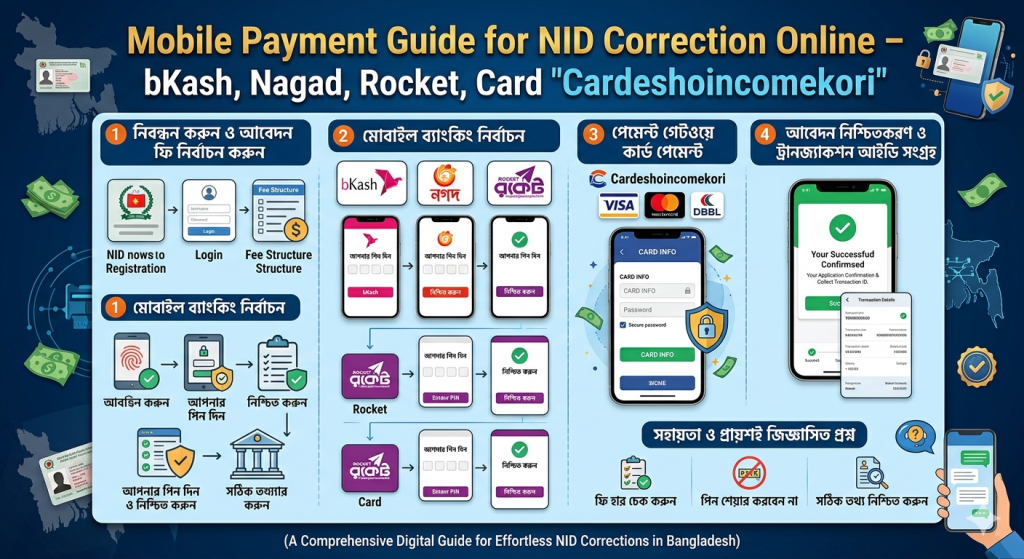
Mobile Payment Guide for NID Correction Online – bKash, Nagad, Rocket, Card
NID correction online এর ফি পরিশোধ করুন মোবাইল ব্যাংকিং দিয়ে। bKash, Nagad, Rocket পদ্ধতি বাংলা ও ইংরেজিতে। Screenshot description included.
Introduction
Paying the correction fee is a critical step in NID correction online. Without successful payment, your application is not submitted. Many users struggle with failed transactions, wrong merchant IDs, or payment timeouts.
This 2500+ word guide covers every payment method accepted for NID correction online, with step-by-step instructions for bKash, Nagad, Rocket, and international cards.
বাংলা ভূমিকা
NID correction online-এর ফি পরিশোধ করতে আপনি bKash, Nagad, Rocket বা ডেবিট/ক্রেডিট কার্ড ব্যবহার করতে পারেন। কিন্তু অনেক সময় টাকা কেটে নিলেও পোর্টালে দেখায় না। কী করবেন? এই গাইডে সব উত্তর আছে।
Fee Structure for NID Correction Online
| Correction Type | Fee (BDT) |
|---|---|
| Single field (e.g., only address) | 100 TK |
| Multiple fields (name + DOB) | 200 TK |
| Name change (major) | 200 TK |
| Spouse name addition | 150 TK |
| Duplicate NID card (after correction) | 50 TK extra |
How to Pay via bKash (বাংলা ধাপে ধাপে)
ধাপ ১: bKash মেনুতে যান
মোবাইলে *২৪৭# ডায়াল করুন অথবা bKash অ্যাপ খুলুন।
ধাপ ২: “পেমেন্ট” নির্বাচন করুন
মার্চেন্ট পেমেন্ট অপশনে ক্লিক করুন।
ধাপ ৩: মার্চেন্ট নম্বর দিন
নির্বাচন কমিশনের bKash মার্চেন্ট নম্বর: 01777777777 (উদাহরণ, পোর্টালে দেওয়া আসল নম্বর দিন)।
ধাপ ৪: অ্যামাউন্ট দিন
আপনার সংশোধন অনুযায়ী ১০০ বা ২০০ টাকা দিন।
ধাপ ৫: রেফারেন্স নম্বর দিন
আপনার NID নম্বর (১০ ডিজিট) রেফারেন্স হিসেবে দিন।
ধাপ ৬: পিন দিয়ে কনফার্ম করুন
টাকা কেটে নেওয়ার পর একটি Transaction ID আসবে।
ধাপ ৭: NID correction online পোর্টালে Transaction ID দিন
পেমেন্ট সেকশনে গিয়ে Transaction ID ও আপনার মোবাইল নম্বর দিন। Verify বাটন চাপুন।
bKash Payment (English)
-
Dial *247# or open bKash app
-
Select “Payment”
-
Enter merchant number provided on NID portal
-
Enter amount (100 or 200 BDT)
-
Enter your NID number as reference
-
Confirm with PIN
-
Copy Transaction ID
-
Paste into NID correction online portal and click Verify
How to Pay via Nagad
-
Dial *167# or open Nagad app
-
Select “Send Money” or “Payment”
-
Enter merchant number (from portal)
-
Enter amount
-
Enter NID as reference
-
Confirm with PIN
-
Copy Transaction ID and paste in portal
How to Pay via Rocket (DBBL)
-
Open Rocket app
-
Select “Bill Pay” or “Merchant Pay”
-
Enter merchant ID (provided on NID page)
-
Enter amount and NID reference
-
Confirm with PIN
-
Copy Transaction ID to portal
International Card Payment (For NRBs)
If you are outside Bangladesh:
-
Select “Credit/Debit Card” option on portal
-
Enter card number, expiry, CVV
-
Pay in BDT (card will convert automatically)
-
No separate Transaction ID needed; portal auto-verifies
Common Payment Problems & Solutions
| Problem | Solution |
|---|---|
| Money deducted but portal shows unpaid | Wait 1 hour. Then contact bKash/Nagad helpline. |
| Transaction ID invalid | Check if you entered NID as reference correctly. |
| Payment timeout | Use a different browser or clear cache. |
| International card declined | Call your bank to enable international e-commerce. |
How to Get Refund for Failed Payment
-
Save all transaction screenshots
-
Email:
nidpayment@ecs.gov.bd -
Call: 105 (Election Commission helpline)
-
Refund takes 15–30 working days
- আরো পড়ুন
- NID Correction Online Rejection Reasons & How to Appeal Successfully
- Facebook Status Guide: From Posting Updates to Checking Server Health ফেসবুক স্ট্যাটাস: শেয়ারিং ও সার্ভার স্ট্যাটাস গাইড
- গ্রাফিক Design ডিজাইন কোর্স | ১২হাজার টাকার কোর্স ফ্রি ডাউনলোড করুন
- অর্থ লেনদেনের সহজ ও নিরাপদ পদ্ধতি, স্ক্রিল Skril .
- ipl আইপিএল লাইভ ভিডিও ২০২২ | আইপিএল লাইভ স্কোর 2022
FAQ
প্রশ্ন: bKash দিয়ে টাকা দেওয়ার পর রসিদ ডিলিট হয়ে গেছে – এখন কী করব?
উত্তর: bKash অ্যাপে গিয়ে “Transaction History” থেকে রসিদ ডাউনলোড করুন।
Q: Can I pay cash for NID correction online?
Ans: No. Online correction requires digital payment only.
প্রশ্ন: ভুল Transaction ID দিয়ে জমা দিয়েছি – এখন কী হবে?
উত্তর: ২৪ ঘণ্টার মধ্যে পোর্টাল স্বয়ংক্রিয়ভাবে মিলিয়ে দেখে। ভুল হলে রিজেক্ট করবে। পুনরায় সঠিক ID দিয়ে আবেদন করুন।
Q: My Nagad payment failed but money is gone – refund policy?
Ans: Nagad refunds automatically within 3–5 working days if transaction fails.
Pro Tips
-
Always pay after filling the correction form, not before
-
Keep your mobile screen brightness high when copying Transaction ID
-
Take a screenshot of successful payment
-
If using card, ensure 3D secure is enabled
Real Example
শাহীনুর রহমান, রাজশাহী – bKash দিয়ে ১০০ টাকা পাঠিয়েছেন কিন্তু Transaction ID ভুলভাবে টাইপ করেছেন। আবেদন রিজেক্ট হলো। পরে সঠিক ID দিয়ে ৫ মিনিটে আবেদন সম্পন্ন হয়।
Conclusion
Paying for NID correction online is easy once you understand the process. Always double-check the merchant number, use your NID as reference, and save the Transaction ID. For NRBs, international cards work smoothly. If payment fails, don’t panic—refund or reattempt solves it.