


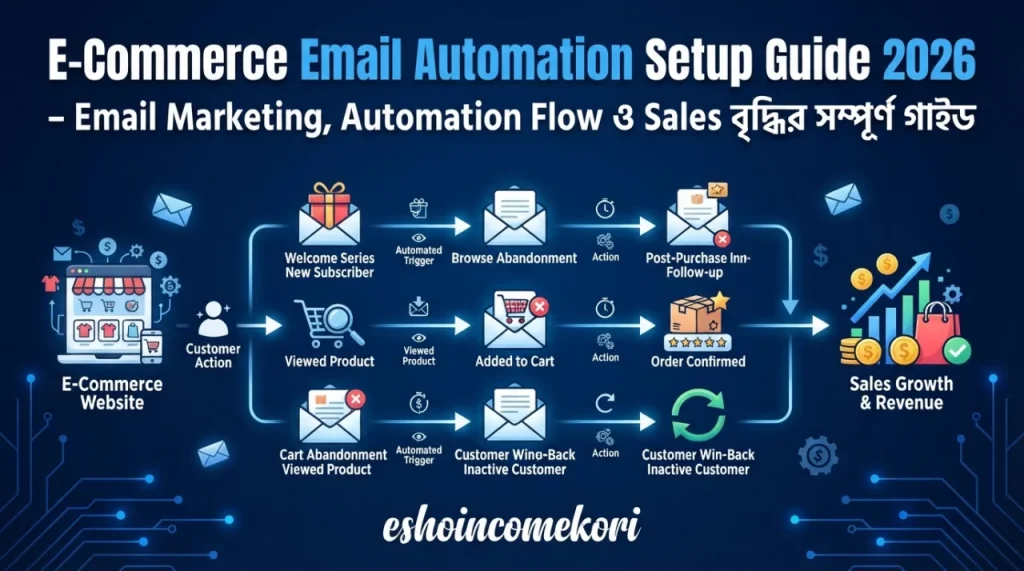
E-Commerce Email Automation Setup Guide 2026 – Email Marketing, Automation Flow ও Sales বৃদ্ধির সম্পূর্ণ গাইড
E-Commerce Email Automation Setup Guide 2026 – Best Email Flows, Tools, Strategy & Complete Setup E-Commerce Email Automation Setup Guide 2026 শিখুন। Welcome, Abandoned Cart, Post-Purchase, Winback, segmentation, email tools ও automation strategy।
Introduction
একজন customer website-এ এসে product দেখল, cart-এ যোগ করল, কিন্তু purchase করল না। আরেকজন purchase করার পর আর website-এ ফিরে এল না। অন্যদিকে নতুন একজন visitor newsletter-এ subscribe করলেও brand সম্পর্কে কিছু না জেনেই inactive হয়ে গেল।
এই customer journey-গুলোর প্রতিটিতে manually email পাঠানো সম্ভব, কিন্তু বড় e-commerce business-এর জন্য তা সময়সাপেক্ষ এবং inefficient।
এখানেই E-Commerce Email Automation গুরুত্বপূর্ণ।
Email automation ব্যবহার করে customer-এর নির্দিষ্ট action অনুযায়ী automatically relevant email পাঠানো যায়। যেমন—নতুন subscriber-কে welcome email, abandoned cart customer-কে reminder, purchase-এর পরে thank-you বা review email এবং দীর্ঘদিন inactive customer-কে winback email।
বর্তমান Klaviyo documentation-এ Welcome Series, Abandoned Cart, Post-Purchase এবং Winback-কে গুরুত্বপূর্ণ ecommerce automation flow হিসেবে উল্লেখ করা হয়েছে।
এই guide-এ E-Commerce Email Automation Setup Guide 2026 অনুযায়ী একটি effective automation system কীভাবে তৈরি করবেন, কোন flow আগে করবেন, segmentation কীভাবে করবেন এবং কোন ভুলগুলো এড়িয়ে চলবেন—তা সহজভাবে আলোচনা করা হলো।
E-Commerce Email Automation কী?
E-commerce email automation হলো এমন একটি automated marketing system যেখানে customer-এর action, behavior বা নির্দিষ্ট condition অনুযায়ী automatically email পাঠানো হয়।
উদাহরণ:
Customer Signup
↓
Welcome Email
↓
Product Recommendation
↓
Purchase
↓
Thank You
↓
Review Request
↓
Repeat Purchase
এখানে marketer প্রতিটি email manually পাঠাচ্ছেন না। Predefined trigger এবং workflow অনুযায়ী system নিজে email পাঠাচ্ছে।
Email Automation কেন গুরুত্বপূর্ণ?
একটি e-commerce website-এ প্রতিটি visitor একই অবস্থায় থাকে না।
কেউ:
- প্রথমবার website-এ এসেছে
- Product দেখেছে
- Cart-এ product রেখেছে
- Checkout শুরু করেছে
- Purchase করেছে
- Repeat customer
- অনেকদিন inactive
প্রতিটি customer-এর জন্য একই email পাঠালে personalization কমে যায়।
Automation-এর মাধ্যমে customer journey অনুযায়ী communication করা যায়।
Quick Summary
| Automation Flow | মূল উদ্দেশ্য |
|---|---|
| Welcome Series | New subscriber nurture |
| Abandoned Cart | Lost sale recover |
| Browse Abandonment | Product interest re-engage |
| Post-Purchase | Customer relationship |
| Review Request | Social proof |
| Cross-Sell | Related product sales |
| Upsell | Higher-value purchase |
| Winback | Inactive customer ফিরিয়ে আনা |
| Back-in-Stock | Product availability alert |
| Replenishment | Repeat purchase |
E-Commerce Email Automation-এর জন্য কী লাগবে?
Setup শুরু করার আগে সাধারণত প্রয়োজন:
- E-commerce website
- Customer email list
- Email marketing platform
- Store integration
- Product catalogue
- Customer/order data
- Domain authentication
- Automation workflows
- Consent/compliance process
Shopify-এর current guidance অনুযায়ী branded sender email ব্যবহার করলে domain authentication এবং SPF, DKIM ও DMARC configuration deliverability-এর জন্য গুরুত্বপূর্ণ।
Popular Email Automation Tools
E-commerce email automation-এর জন্য বিভিন্ন platform ব্যবহার করা যায়।
উদাহরণ:
- Klaviyo
- Mailchimp
- HubSpot
- Omnisend
- ActiveCampaign
কোন tool সবচেয়ে ভালো হবে তা নির্ভর করে:
- Store platform
- Contact volume
- Automation complexity
- Budget
- Segmentation requirement
- Reporting needs
এই article-এ workflow concept বোঝাতে Klaviyo-এর terminology ব্যবহার করা হয়েছে, কারণ এর current ecommerce flow library-তে বিভিন্ন pre-built automation রয়েছে।
Step 1: E-Commerce Platform Integrate করুন
প্রথমে আপনার ecommerce store-এর সঙ্গে email automation platform integrate করুন।
উদাহরণ:
Shopify
↓
Email Platform
↓
Customer Data
↓
Product Data
↓
Order Data
↓
Automation
Integration-এর পরে customer এবং order events সঠিকভাবে sync হচ্ছে কিনা পরীক্ষা করুন।
Step 2: Sender Domain Configure করুন
Professional email marketing-এর জন্য নিজের business domain ব্যবহার করা ভালো।
উদাহরণ:
ভালো:
hello@example.com
কম professional:
randommarketing123@gmail.com
Domain authentication-এর জন্য সাধারণত SPF, DKIM এবং DMARC-related DNS records configure করতে হয়।
Shopify-এর বর্তমান documentation-এ third-party domain-এর জন্য email authentication এবং DMARC-এর গুরুত্ব উল্লেখ করা হয়েছে।
Step 3: Customer List তৈরি করুন
Customer data properly organize করুন।
উদাহরণ:
- Newsletter subscribers
- First-time customers
- Repeat customers
- VIP customers
- Inactive customers
- Product-category buyers
সব contact-কে এক list-এ রেখে একই message পাঠানো automation-এর মূল উদ্দেশ্যকে দুর্বল করতে পারে।
Step 4: Welcome Email Automation
Customer newsletter বা marketing list-এ subscribe করলে Welcome Series trigger হতে পারে।
একটি simple sequence:
Email 1 → Immediately
Welcome + brand introduction
Email 2 → 1–2 days later
Product/category education
Email 3 → 2–3 days later
Best sellers বা social proof
Email 4 → Optional
First-purchase incentive
Klaviyo-এর current guidance অনুযায়ী welcome series নতুন subscribers-কে brand-এর সঙ্গে পরিচিত করানোর গুরুত্বপূর্ণ customer-lifecycle flow।
Step 5: Abandoned Cart Automation
এটি e-commerce-এর সবচেয়ে গুরুত্বপূর্ণ automationগুলোর একটি।
Customer:
Product → Cart → Checkout
কিন্তু purchase সম্পন্ন করল না।
তখন:
Abandoned Cart Flow
trigger হতে পারে।
Klaviyo-এর current 2026 guidance abandoned-cart flow-এর প্রথম message সাধারণত checkout শুরু হওয়ার কয়েক ঘণ্টা পরে পাঠানোর উদাহরণ দেয় এবং পরবর্তী message-এর জন্য longer delay ব্যবহারের পরামর্শ দেয়।
একটি example:
Email 1: 2–4 hours পরে
“আপনার cart-এ কিছু product এখনও রয়েছে।”
Email 2: 20–48 hours পরে
Product benefits + social proof
Email 3: প্রয়োজন হলে
Limited incentive বা final reminder
তবে সব customer-কে discount দেওয়া উচিত নয়।
Klaviyo-এর বর্তমান guidance প্রথম abandoned-cart email-এ coupon না দেওয়ার পরামর্শ দেয়, কারণ নিয়মিত discount customer-কে ইচ্ছাকৃতভাবে cart abandon করতে উৎসাহিত করতে পারে।
Step 6: Purchase Exclusion Setup করুন
এটি অত্যন্ত গুরুত্বপূর্ণ।
ধরুন customer cart abandon করেছে।
তারপর customer purchase করল।
কিন্তু automation filter ঠিক না থাকায় customer এখনও abandoned-cart email পেতে থাকল।
এটি customer experience-এর জন্য খারাপ।
তাই flow-এ condition রাখতে পারেন:
Placed Order = 0 since entering flow
Klaviyo-এর current abandoned-cart documentation-এ purchase করার পর customer-কে flow থেকে বাদ দেওয়ার জন্য এমন filter ব্যবহারের নির্দেশনা রয়েছে।
Step 7: Browse Abandonment
Customer product দেখেছে কিন্তু cart-এ যোগ করেনি।
তখন Browse Abandonment flow ব্যবহার করা যায়।
উদাহরণ:
Product Viewed
↓
No Purchase
↓
Browse Abandonment Email
Email-এ সেই product বা relevant category highlight করা যেতে পারে।
এই ধরনের flow product interest অনুযায়ী communication personalize করতে সাহায্য করে।
Step 8: Post-Purchase Automation
Customer purchase করার পরে relationship শেষ নয়।
বরং এখান থেকেই repeat purchase-এর opportunity তৈরি হয়।
একটি post-purchase sequence হতে পারে:
Order
↓
Thank You
↓
Product Instructions
↓
Review Request
↓
Cross-Sell
↓
Repeat Purchase
Klaviyo-এর current post-purchase guidance-এ thank-you, review request, cross-sell এবং upsell-এর মতো flow ব্যবহার করার উদাহরণ রয়েছে।
Step 9: Review Request Automation
Product delivery-এর কিছু সময় পরে customer-কে review request পাঠাতে পারেন।
Email structure:
Subject:
“আপনার নতুন product কেমন লাগছে?”
Body:
- Product reminder
- Short review request
- Review link
- Optional incentive
Review customer trust এবং social proof তৈরিতে সাহায্য করতে পারে।
তবে delivery হওয়ার আগেই review request পাঠানো উচিত নয়।
Step 10: Cross-Sell Automation
Customer একটি product কিনেছে।
তার সঙ্গে related product recommend করা যায়।
উদাহরণ:
Running Shoes
→ Socks
→ Sports Bottle
→ Running Accessories
Laptop
→ Mouse
→ Keyboard
→ Laptop Bag
এটি product relationship-এর ওপর ভিত্তি করে automated recommendation তৈরি করতে পারে।
Step 11: Upsell Automation
Upsell হলো customer-কে higher-value option সম্পর্কে জানানো।
উদাহরণ:
Customer basic plan কিনেছে।
Email:
“আপনার জন্য Premium Plan-এর আরও features দেখুন।”
তবে customer-এর purchase history এবং actual need অনুযায়ী upsell করা উচিত।
Step 12: Winback Automation
Customer অনেকদিন ধরে purchase করছে না।
তখন Winback flow ব্যবহার করা যায়।
উদাহরণ:
Last Purchase
↓
60 Days No Purchase
↓
Reminder
↓
Product Recommendation
↓
Special Offer
↓
Final Winback Email
Winback flow-এর timing business এবং product purchase cycle অনুযায়ী পরিবর্তন করা উচিত।
Step 13: Replenishment Automation
যেসব product নিয়মিত শেষ হয়ে যায়, সেখানে replenishment automation কার্যকর হতে পারে।
উদাহরণ:
- Skincare
- Supplements
- Coffee
- Pet food
- Household products
- Beauty products
যদি average purchase cycle 30–60 দিন হয়, সেই pattern অনুযায়ী reminder পাঠানো যেতে পারে।
Klaviyo-এর current flow guidance replenishment flow-কে repeat-purchase cycle-এর সঙ্গে মিলিয়ে ব্যবহার করার কথা উল্লেখ করে।
Step 14: Back-in-Stock Automation
কোনো product out of stock ছিল।
Customer notification request করেছিল।
Product আবার available হলে:
Back-in-Stock Email
পাঠানো যায়।
উদাহরণ:
“আপনার অপেক্ষার product আবার stock-এ এসেছে!”
এই flow high-intent customer-কে দ্রুত website-এ ফিরিয়ে আনতে পারে।
Step 15: Segmentation Setup
সব customer একই নয়।
Segment তৈরি করতে পারেন:
New Subscribers
যারা recently signup করেছে।
First-Time Buyers
যারা প্রথম purchase করেছে।
Repeat Customers
যারা multiple orders করেছে।
VIP Customers
High-value customer।
Inactive Customers
দীর্ঘদিন purchase করেনি।
Category Buyers
নির্দিষ্ট product category কিনেছে।
High-Intent Visitors
অনেক product view করেছে বা checkout শুরু করেছে।
Step 16: Behavioral Segmentation
Customer behavior-এর ভিত্তিতে automation আরও personalized করা যায়।
Consider করুন:
- Viewed product
- Added to cart
- Started checkout
- Purchased
- Purchase frequency
- Order value
- Category interest
- Email engagement
Klaviyo-এর current flow system event/metric-based triggers ব্যবহার করে behavior অনুযায়ী automation তৈরি করতে দেয়।
Step 17: Dynamic Product Recommendations
Customer-এর previous behavior বা purchase history অনুযায়ী product recommendation দেখাতে পারেন।
উদাহরণ:
Customer:
Men’s Running Shoes
দেখেছে।
Email:
Related Running Products
এভাবে generic newsletter-এর পরিবর্তে personalized content তৈরি করা যায়।
Step 18: Email Personalization
Basic personalization:
Hi {{First Name}},
আরও advanced personalization:
- Recently viewed product
- Previous purchase
- Product category
- Location
- Customer segment
- Order history
তবে personalization ভুল হলে customer trust ক্ষতিগ্রস্ত হতে পারে। তাই data accuracy গুরুত্বপূর্ণ।
Step 19: Subject Line Optimization
Email open করার আগে customer প্রথমে subject line দেখে।
Examples:
Weak:
“New Products Available”
Better:
“আপনার পছন্দের নতুন products এসেছে”
আরও effective হতে পারে:
- Benefit-focused
- Curiosity
- Urgency
- Personalization
- Clear offer
তবে misleading subject line ব্যবহার করবেন না।
Step 20: Email Content Structure
একটি ভালো ecommerce email সাধারণত:
Hook
↓
Problem/Need
↓
Product Benefit
↓
Social Proof
↓
Offer বা Value
↓
CTA
একটি email-এ অনেকগুলো competing CTA না রাখাই ভালো।
Step 21: Mobile Optimization
অনেক customer mobile device থেকে email পড়েন।
তাই check করুন:
- Responsive template
- Large readable text
- Proper image size
- Clear CTA
- Short paragraphs
- Fast-loading images
Email পাঠানোর আগে mobile preview করুন।
Step 22: Deliverability
Automation setup করলেই email inbox-এ পৌঁছাবে—এমন guarantee নেই।
Deliverability improve করতে:
- Authenticated domain ব্যবহার করুন
- Clean email list রাখুন
- Invalid addresses remove করুন
- Spam complaints monitor করুন
- Engagement monitor করুন
- Unengaged users-এর জন্য re-engagement strategy তৈরি করুন
Email deliverability-এর technical foundation হিসেবে SPF, DKIM এবং DMARC configuration গুরুত্বপূর্ণ।
Step 23: Consent Management
Marketing email পাঠানোর আগে applicable consent এবং privacy requirements follow করুন।
বিশেষ করে:
- Subscriber কীতে consent দিয়েছে
- Marketing vs transactional email
- Unsubscribe mechanism
- Data collection
- Data storage
- Regional privacy requirements
এসব পরিষ্কার রাখুন।
একজন customer order confirmation-এর জন্য email দিয়েছে মানেই সে সব promotional email-এর জন্য automatically subscribed—এমন ধরে নেওয়া উচিত নয়।
Step 24: Automation Frequency Control
একজন customer একই সময়ে:
- Welcome Flow
- Abandoned Cart
- Browse Abandonment
- Post-Purchase
- Promotional Campaign
সবগুলোতে ঢুকে যেতে পারে।
ফলে email overload হতে পারে।
Klaviyo-এর current post-purchase guidance Smart Sending-এর মতো frequency-control feature ব্যবহার করে অতিরিক্ত messaging কমানোর পরামর্শ দেয়।
Step 25: Automation Testing
Flow live করার আগে test করুন:
- Trigger
- Email content
- Personalization
- Product data
- Links
- Coupon
- Unsubscribe
- Mobile design
- Purchase exclusion
- Timing
- Segmentation
বিশেষ করে abandoned cart flow test করার সময় test order সম্পন্ন করে দেখুন purchase করার পরে পরবর্তী abandoned-cart emails বন্ধ হচ্ছে কিনা।
Step 26: Analytics Monitor করুন
প্রতিটি automation-এর performance আলাদাভাবে দেখুন।
Important metrics:
- Delivery rate
- Open rate
- Click rate
- Conversion rate
- Revenue
- Revenue per recipient
- Unsubscribe rate
- Spam complaints
- Bounce rate
শুধু open rate দেখে automation সফল হয়েছে কিনা বিচার করবেন না।
শেষ পর্যন্ত business outcome গুরুত্বপূর্ণ।
Step 27: A/B Testing
Email automation optimize করতে A/B testing করুন।
Test করতে পারেন:
- Subject line
- CTA
- Offer
- Image
- Email length
- Send timing
- Product recommendation
- Discount vs no discount
একবারে একটি major variable test করলে result বোঝা সহজ হয়।
Recommended E-Commerce Automation Funnel
একটি practical setup:
New Subscriber
↓
Welcome Series
↓
Browse Product
↓
Browse Abandonment
↓
Add to Cart
↓
Abandoned Cart
↓
Purchase
↓
Thank You
↓
Review Request
↓
Cross-Sell
↓
Replenishment
↓
Winback
এই funnel business অনুযায়ী ছোট বা বড় করা যায়।
কোন Automation আগে Setup করবেন?
নতুন ecommerce store হলে সব flow একসঙ্গে তৈরি করার দরকার নেই।
প্রথমে:
Priority 1
Welcome Series
Priority 2
Abandoned Cart
Priority 3
Post-Purchase
Priority 4
Browse Abandonment
Priority 5
Winback
Klaviyo-এর current getting-started guidance-ও Welcome, Abandoned Cart, Post-Purchase এবং Winback-কে initial high-impact flows হিসেবে অগ্রাধিকার দেয়।
E-Commerce Email Automation-এর সুবিধা
Automated Sales
Manual intervention ছাড়াই customer journey-এর বিভিন্ন stage-এ communication করা যায়।
Better Personalization
Customer behavior অনুযায়ী relevant message পাঠানো যায়।
Cart Recovery
Purchase না করা customer-কে reminder দেওয়া যায়।
Customer Retention
Post-purchase এবং winback flow repeat purchase-এর সুযোগ তৈরি করে।
Time Saving
একবার properly configure করলে automation repeatedly কাজ করতে পারে।
Scalable Marketing
Customer সংখ্যা বাড়লেও প্রতিটি message manually পাঠাতে হয় না।
সীমাবদ্ধতা
Setup Complexity
Advanced automation-এর জন্য technical knowledge প্রয়োজন হতে পারে।
Data Quality
Wrong customer data হলে wrong personalization হতে পারে।
Deliverability Risk
অতিরিক্ত বা low-quality email spam complaints বাড়াতে পারে।
Integration Issues
E-commerce platform এবং email tool-এর event sync সমস্যা হতে পারে।
Content Requirement
Automation সফল করতে নিয়মিত ভালো email content তৈরি করতে হয়।
Common Mistakes
1. সব Customer-কে একই Email পাঠানো
Segmentation ব্যবহার করুন।
2. অতিরিক্ত Discount দেওয়া
প্রতিটি abandoned cart email-এ coupon দিলে customer discount-এর জন্য অপেক্ষা করতে পারে।
3. Purchase-এর পরেও Cart Email পাঠানো
Purchase exclusion filter ব্যবহার করুন।
4. Email Overload
একই customer-কে একসঙ্গে অনেক automation-এ রাখা উচিত নয়।
5. Domain Authentication না করা
SPF, DKIM এবং DMARC setup review করুন।
6. Mobile Design Ignore করা
Desktop-এর পাশাপাশি mobile preview করুন।
7. Broken Link রাখা
Live করার আগে সব CTA test করুন।
8. Incorrect Personalization
Customer name বা product information ভুল দেখানো trust নষ্ট করতে পারে।
9. Analytics Ignore করা
Revenue এবং conversion metrics monitor করুন।
10. সব Flow একদিনে তৈরি করা
Priority অনুযায়ী essential flows আগে live করুন।
Expert Tips
Tip 1: Customer Journey Map করুন
Automation তৈরি করার আগে customer journey কাগজে বা diagram-এ তৈরি করুন।
Tip 2: Revenue-Focused Flow Prioritize করুন
Welcome, abandoned cart এবং post-purchase দিয়ে শুরু করা practical।
Tip 3: Discount Dependency কমান
প্রথমে value, product benefit এবং trust দেখান।
Tip 4: Purchase Data ব্যবহার করুন
Customer কী কিনেছে তার ওপর ভিত্তি করে cross-sell এবং replenishment তৈরি করুন।
Tip 5: Frequency Cap রাখুন
একজন customer যেন অল্প সময়ে excessive email না পায়।
Tip 6: Automation Regularly Audit করুন
Product price, inventory, links, coupons এবং segmentation rules পরিবর্তন হলে flow update করুন।
2026 E-Commerce Email Automation Checklist
- E-commerce platform integrated
- Email marketing platform connected
- Sender domain authenticated
- SPF configured
- DKIM configured
- DMARC reviewed
- Customer consent process checked
- Customer segments created
- Welcome flow active
- Abandoned cart flow active
- Purchase exclusion configured
- Browse abandonment active
- Post-purchase flow active
- Review request configured
- Cross-sell flow planned
- Winback flow active
- Back-in-stock flow configured if needed
- Replenishment flow configured if applicable
- Mobile templates tested
- Personalization tested
- Links checked
- Analytics configured
- A/B testing planned
- Frequency limits reviewed
আরও পড়ুন
This app is making people rich ২০২৬ সালের ভাইরাল অ্যাপ ট্রেন্ড ও বাস্তব বিশ্লেষণ
How to Earn from Affiliate Marketing: ২০২৬ সালে Affiliate Marketing থেকে Income করার সম্পূর্ণ গাইড
Best AI Tools for Beginners 2026: Complete Guide to Start Using Artificial Intelligence
AI Tools for Productivity: ২০২৬ সালে কাজের গতি ও দক্ষতা বাড়ানোর সেরা AI টুলস
FAQ
E-Commerce Email Automation কী?
Customer-এর action বা behavior অনুযায়ী automatically email পাঠানোর system-কে e-commerce email automation বলা হয়।
E-commerce-এর জন্য সবচেয়ে গুরুত্বপূর্ণ email automation কোনগুলো?
সাধারণত Welcome, Abandoned Cart, Post-Purchase, Browse Abandonment এবং Winback দিয়ে শুরু করা ভালো।
Abandoned Cart Email কখন পাঠানো উচিত?
একটি broad starting point হিসেবে checkout abandonment-এর কয়েক ঘণ্টা পরে প্রথম reminder এবং পরে follow-up ব্যবহার করা যায়। তবে product ও customer journey অনুযায়ী timing test করা উচিত।
Abandoned Cart Email-এ discount দেওয়া উচিত?
সবসময় নয়। প্রথম email-এ discount না দিয়ে reminder ও product value দেখানো যেতে পারে। প্রয়োজনে পরবর্তী message-এ targeted incentive ব্যবহার করা যায়।
Post-Purchase Email কী?
Customer purchase করার পরে thank-you, product instructions, review request, cross-sell বা loyalty communication-এর জন্য পাঠানো automated email।
Winback Email কী?
যেসব customer আগে purchase করেছে কিন্তু দীর্ঘদিন ধরে inactive, তাদের পুনরায় engage করার জন্য winback email ব্যবহার করা হয়।
Welcome Series কেন প্রয়োজন?
নতুন subscriber-এর সঙ্গে প্রথম relationship তৈরি এবং brand/product সম্পর্কে পরিচয় করানোর জন্য Welcome Series গুরুত্বপূর্ণ।
Email automation-এর জন্য কোন tool ভালো?
Klaviyo, Mailchimp, Omnisend, HubSpot এবং ActiveCampaign-এর মতো platform ব্যবহার করা যায়। কোনটি ভালো তা store size, budget, integration এবং automation requirement-এর ওপর নির্ভর করে।
Shopify-এর সঙ্গে email automation integrate করা যায়?
হ্যাঁ। Shopify-এর সঙ্গে বিভিন্ন email marketing platform integrate করা যায়। Integration-এর পরে customer, product এবং order event সঠিকভাবে sync হচ্ছে কিনা পরীক্ষা করা গুরুত্বপূর্ণ।
SPF, DKIM ও DMARC কেন প্রয়োজন?
এগুলো email-domain authentication এবং deliverability-এর technical foundation-এর অংশ। Branded sender domain ব্যবহার করলে এগুলোর configuration review করা উচিত।
Email automation কি sales বাড়াতে পারে?
সঠিক customer segmentation, timing, content এবং offer ব্যবহার করলে automation lost opportunities recover এবং repeat purchase encourage করতে পারে। তবে কোনো নির্দিষ্ট revenue বা ROI guarantee করা যায় না।
একজন customer কি একাধিক automation-এ থাকতে পারে?
হ্যাঁ, তবে flow prioritization এবং frequency control না থাকলে customer অতিরিক্ত email পেতে পারে। তাই exclusion rules ও sending limits ব্যবহার করা ভালো।
Purchase করার পর abandoned cart email বন্ধ করা যায়?
হ্যাঁ। Flow filter ব্যবহার করে purchase করা customer-কে পরবর্তী abandoned-cart message থেকে বাদ দেওয়া যায়।
Review Request কখন পাঠাব?
Product delivery বা customer product ব্যবহারের জন্য যথেষ্ট সময় পাওয়ার পরে পাঠানো ভালো। Timing product-এর ধরন অনুযায়ী পরিবর্তিত হবে।
E-commerce email automation কি ছোট business-এর জন্যও useful?
হ্যাঁ। ছোট store-ও Welcome, Abandoned Cart এবং Post-Purchase-এর মতো কয়েকটি essential flow দিয়ে শুরু করতে পারে।
Email automation কি manually manage করতে হয়?
Automation live হওয়ার পরে email নির্দিষ্ট trigger অনুযায়ী automatically পাঠানো যায়। তবে content, links, product information, segmentation এবং performance নিয়মিত monitor করতে হবে।
Conclusion
E-Commerce Email Automation Setup Guide 2026 অনুসরণ করলে একটি online store-এর customer communication অনেক বেশি systematic করা সম্ভব।
একটি effective automation ecosystem হতে পারে:
Welcome → Browse → Abandoned Cart → Purchase → Post-Purchase → Review → Cross-Sell → Replenishment → Winback
শুরুতেই ২০টি automation তৈরি করার প্রয়োজন নেই। প্রথমে Welcome Series, Abandoned Cart এবং Post-Purchase setup করুন। এরপর website-এর customer behavior ও sales data দেখে Browse Abandonment, Winback, Replenishment এবং অন্যান্য advanced flow যোগ করুন।
সবচেয়ে গুরুত্বপূর্ণ বিষয় হলো automation মানেই শুধু বেশি email পাঠানো নয়। Right customer + Right message + Right timing + Right offer—এই চারটি বিষয় ঠিকভাবে মিলাতে পারলেই email automation একটি শক্তিশালী e-commerce marketing channel হয়ে উঠতে পারে।
শেষ পর্যন্ত automation-এর success শুধু email open বা click দিয়ে নয়, বরং conversion, repeat purchase, revenue এবং customer experience দিয়ে বিচার করুন।