


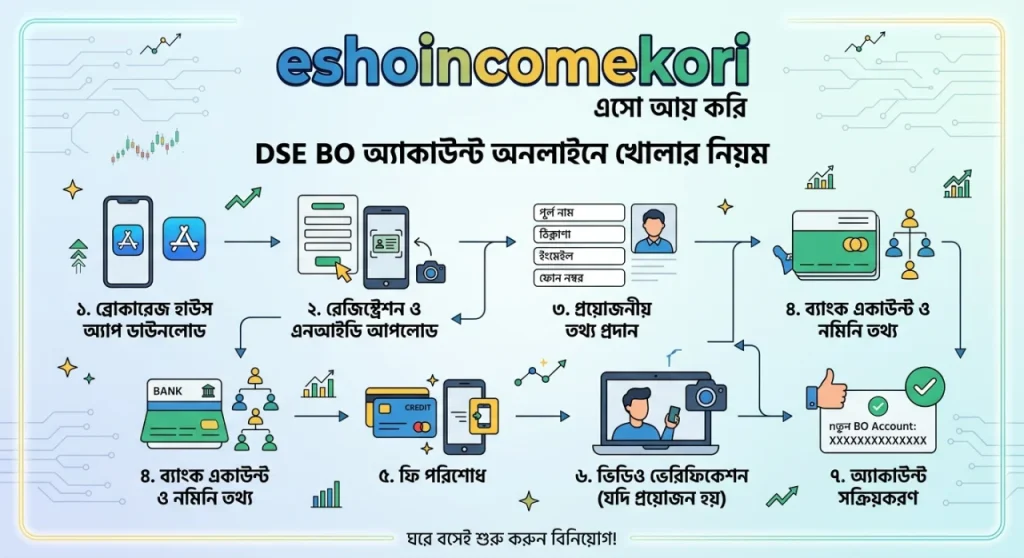
DSE BO Account Online Opening Rules
DSE BO Account Online Opening Rules in Bangladesh 2026 – Complete Guide Bangladesh থেকে DSE BO account online কীভাবে খুলবেন? BO account requirements, documents, fees, CDBL, broker selection ও online trading rules জানুন।
Introduction
Bangladesh-এর stock market-এ listed shares কেনাবেচা করতে চাইলে একটি BO (Beneficiary Owner) Account প্রয়োজন। এই account-এর মাধ্যমে আপনার securities electronic form-এ রাখা এবং share transaction পরিচালনা করা হয়।
অনেকেই মনে করেন BO account মানেই trading account। আসলে বিষয়টি একটু আলাদা।
সহজভাবে:
BO Account → Securities রাখা
Trading Account → Buy/Sell order দেওয়া
Broker → আপনার trading ও BO services পরিচালনায় সহায়তা করে
Bangladesh-এর capital market-এ BO account opening এবং maintenance-এর সঙ্গে CDBL, broker/DP এবং BSEC-এর applicable rules জড়িত।
গুরুত্বপূর্ণ: Account opening fees, annual charges, required documents এবং online onboarding procedures broker ও সময় অনুযায়ী পরিবর্তিত হতে পারে। আবেদন করার আগে আপনার নির্বাচিত broker/DP এবং CDBL-এর current requirements যাচাই করুন।
BO Account কী?
BO-এর পূর্ণরূপ Beneficiary Owner।
আপনি যখন listed shares কিনবেন, securities electronic form-এ আপনার ownership হিসেবে record করার জন্য BO account ব্যবহৃত হয়।
একটি simplified structure:
Investor
↓
Broker / Depository Participant
↓
CDBL
↓
BO Account
DSE কী?
DSE হলো Dhaka Stock Exchange, Bangladesh-এর প্রধান stock exchange-এর একটি।
DSE-তে বিভিন্ন listed securities trade করা হয়।
তবে investor সাধারণত সরাসরি exchange-এ গিয়ে share কিনে না। Registered broker-এর মাধ্যমে buy/sell order place করতে হয়।
CDBL কী?
CDBL (Central Depository Bangladesh Limited) Bangladesh-এর central securities depository।
Electronic securities holding এবং settlement infrastructure-এর গুরুত্বপূর্ণ অংশ হিসেবে CDBL কাজ করে।
BO account-এর সঙ্গে CDBL-এর relationship তাই অত্যন্ত গুরুত্বপূর্ণ।
BO Account Online-এ খোলা যায়?
অনেক broker/DP online onboarding বা digital account opening সুবিধা দিয়ে থাকে।
তবে online opening-এর exact process broker অনুযায়ী আলাদা হতে পারে।
সাধারণত:
Online Application
↓
Identity Verification
↓
Document Submission
↓
Account Approval
↓
BO Account Activation
BO Account খোলার জন্য কী প্রয়োজন?
Individual investor-এর ক্ষেত্রে সাধারণত কিছু information/documents প্রয়োজন হতে পারে:
- NID
- Mobile number
- Email address
- Bank account information
- Photograph
- Signature
- Nominee information
- Tax-related information যেখানে applicable
Exact requirements account type ও broker/DP-এর ওপর নির্ভর করতে পারে।
NID কেন প্রয়োজন?
NID investor identity verification-এর জন্য গুরুত্বপূর্ণ।
Application-এর সময় আপনার নাম, date of birth এবং other identification information documents-এর সঙ্গে consistent থাকা উচিত।
নাম বা information mismatch থাকলে account opening delay হতে পারে।
Bank Account কেন দরকার?
Brokerage account-এর সঙ্গে bank account information প্রয়োজন হতে পারে।
Share-related payments, refunds, dividends বা other financial transactions-এর ক্ষেত্রে linked bank information গুরুত্বপূর্ণ হতে পারে।
আপনার নিজের নামে valid bank account ব্যবহার করা safer এবং applicable rules follow করা উচিত।
Nominee কী?
Nominee হলো এমন একজন ব্যক্তি যাকে investor নির্দিষ্ট circumstances-এ account/securities-related entitlement-এর জন্য nominate করতে পারেন।
Nominee details carefully provide করুন।
প্রয়োজনে nominee information পরে update করার broker-specific procedure থাকতে পারে।
Online BO Account Opening Process
Step 1: Registered Broker নির্বাচন করুন
প্রথমে একটি suitable registered broker বা Depository Participant নির্বাচন করুন।
Broker বাছাইয়ের সময় দেখুন:
- Regulatory status
- Trading platform
- Brokerage charges
- BO charges
- Customer support
- Mobile app
- Online services
- Research facilities
Step 2: Official Website/App ব্যবহার করুন
Broker-এর official website বা official app থেকে account opening শুরু করুন।
Third-party random link ব্যবহার করে sensitive financial information submit করবেন না।
Step 3: Account Type নির্বাচন করুন
আপনি individual investor হলে individual account option থাকতে পারে।
অন্যান্য account types-এর জন্য additional documentation প্রয়োজন হতে পারে।
Step 4: Personal Information দিন
Application-এ সাধারণত দিতে হতে পারে:
- Full name
- NID information
- Date of birth
- Address
- Mobile number
- Profession
সব তথ্য official documents অনুযায়ী দিন।
Step 5: Bank Information দিন
Linked bank account-এর information carefully enter করুন।
Account name এবং bank records-এর সঙ্গে information match করা গুরুত্বপূর্ণ।
Step 6: Nominee Information দিন
Nominee-এর:
- Name
- Relationship
- Identification details
- Other required information
দিতে হতে পারে।
Step 7: Documents Upload করুন
Online application হলে প্রয়োজনীয় documents upload করতে হতে পারে।
Upload করার আগে:
- Image clear কিনা
- Text readable কিনা
- Correct document কিনা
- File format accepted কিনা
check করুন।
Step 8: Identity Verification
Broker/DP-এর process অনুযায়ী verification হতে পারে।
এর মধ্যে:
- NID verification
- OTP
- Digital verification
- Signature verification
- KYC review
থাকতে পারে।
Step 9: Application Review
Broker/DP আপনার application এবং documents review করবে।
Information incomplete বা inconsistent হলে additional information চাইতে পারে।
Step 10: BO Account Activation
Approval complete হলে আপনার BO account active হতে পারে।
এরপর broker-এর trading platform ব্যবহার করে applicable securities transactions শুরু করতে পারবেন।
BO Account এবং Trading Account-এর পার্থক্য
| বিষয় | BO Account | Trading Account |
|---|---|---|
| Main Purpose | Securities holding | Buy/Sell orders |
| Managed Through | Depository participant | Broker |
| Share Ownership Record | Yes | Not the primary function |
| Trading | Directly নয় | Yes |
| CDBL Connection | Yes | Broker system |
দুটো account-related services সাধারণত broker-এর মাধ্যমে connected workflow-এ কাজ করে।
BO Account Opening Fee
BO account opening এবং annual maintenance-এর জন্য charges থাকতে পারে।
Charges depend করতে পারে:
- Broker/DP
- Account type
- Current CDBL/broker schedule
- Additional services
তাই নির্দিষ্ট amount মনে রাখার পরিবর্তে account খোলার আগে current fee schedule দেখে নিন।
Brokerage Fee
Share buy/sell করলে broker commission বা applicable transaction charges থাকতে পারে।
উদাহরণস্বরূপ:
Trade Value × Applicable Brokerage Rate
এর সঙ্গে অন্য regulatory/transaction charges থাকতে পারে।
Exact rate broker এবং applicable regulations অনুযায়ী verify করুন।
BO Account Annual Charge
BO account-এর annual maintenance fee থাকতে পারে।
Fee এবং collection method সময়ের সঙ্গে পরিবর্তিত হতে পারে।
আপনার broker/DP-এর current schedule দেখুন।
Online BO Account-এর সুবিধা
1. Branch Visit কমতে পারে
অনেক onboarding process online করা সম্ভব হতে পারে।
2. Faster Application
Digital verification available থাকলে process সহজ হতে পারে।
3. Convenient
বাসা থেকেই application করা যায়।
4. Digital Documents
Documents electronically submit করা যায়।
BO Account খোলার আগে Broker কীভাবে নির্বাচন করবেন?
শুধু lowest brokerage দেখে broker নির্বাচন করবেন না।
Consider করুন:
Trading Platform
Platform stable কিনা?
Mobile App
App ব্যবহার করা সহজ কিনা?
Customer Support
Problem হলে support পাওয়া যায় কিনা?
Research
Market research বা analytical tools দেয় কিনা?
Charges
Brokerage এবং BO-related charges compare করুন।
Reputation
Regulatory status এবং market reputation check করুন।
DSE Trading শুরু করার Basic Process
BO account active হওয়ার পর simplified process:
Fund Trading Account
↓
Choose Security
↓
Place Buy Order
↓
Order Execution
↓
Settlement
↓
Shares Reflected in BO Holdings
Actual settlement cycle এবং process applicable market rules অনুযায়ী পরিবর্তিত হতে পারে।
DSE-তে Share কেনার আগে কী দেখবেন?
কোনো stock শুধু অন্যের recommendation দেখে কিনবেন না।
Research করুন:
- Company earnings
- Revenue
- EPS
- NAV
- Debt
- Dividend history
- Valuation
- Business model
- Sector outlook
- Corporate disclosures
Fundamental Analysis
Long-term investor হলে fundamental analysis useful হতে পারে।
Consider করুন:
EPS
Company প্রতি share-এ কত earnings generate করছে।
P/E Ratio
Share price এবং earnings-এর relationship।
NAV
Net asset value per share।
Dividend
Company shareholders-কে dividend দিচ্ছে কিনা।
Technical Analysis
Short-term trading-এর ক্ষেত্রে কিছু investor technical analysis ব্যবহার করেন।
Common tools:
- Support
- Resistance
- Moving Average
- RSI
- Volume
- Trend
তবে technical indicators কোনো guaranteed prediction tool নয়।
BO Account Security
আপনার account security অত্যন্ত গুরুত্বপূর্ণ।
Never Share
- Password
- OTP
- PIN
- Trading credentials
অন্য কারও সঙ্গে share করবেন না।
Use
- Strong password
- Two-factor authentication where available
- Official app
- Secure device
Common BO Account Mistakes
Wrong NID Information
Application delay হতে পারে।
Bank Account Mismatch
Bank information ভুল হলে financial transactions-এ সমস্যা হতে পারে।
Duplicate Account Attempt
একাধিক BO account-এর rules account type ও applicable regulations অনুযায়ী হতে পারে। নতুন account খোলার আগে broker/DP-এর সঙ্গে confirm করুন।
Unverified Broker
শুধু social media advertisement দেখে broker নির্বাচন করবেন না।
Ignoring Fees
Account opening-এর আগে all applicable charges জেনে নিন।
Sharing OTP
OTP কখনও অন্যকে দেওয়া উচিত নয়।
DSE BO Account Checklist
- Registered broker/DP selected
- Official website/app verified
- NID ready
- Mobile number ready
- Email ready
- Bank account information ready
- Photograph ready
- Signature ready
- Nominee information ready
- KYC completed
- Documents uploaded
- Application submitted
- Verification completed
- BO account activated
- Trading account funded
- Trading credentials secured
- আরো পড়ুন
- NID Correction Online Rejection Reasons & How to Appeal Successfully
- Facebook Status Guide: From Posting Updates to Checking Server Health ফেসবুক স্ট্যাটাস: শেয়ারিং ও সার্ভার স্ট্যাটাস গাইড
- গ্রাফিক Design ডিজাইন কোর্স | ১২হাজার টাকার কোর্স ফ্রি ডাউনলোড করুন
- অর্থ লেনদেনের সহজ ও নিরাপদ পদ্ধতি, স্ক্রিল Skril .
- ipl আইপিএল লাইভ ভিডিও ২০২২ | আইপিএল লাইভ স্কোর 2022
FAQ
BO Account কী?
BO Account হলো electronic securities holding account, যেখানে আপনার eligible securities ownership record করা হয়।
BO Account কি trading account?
না। BO account মূলত securities holding-এর সঙ্গে সম্পর্কিত, আর trading account দিয়ে buy/sell orders place করা হয়।
Bangladesh-এ BO account online খোলা যায়?
অনেক broker/DP digital বা online onboarding সুবিধা দিতে পারে। Exact process broker-specific।
BO account খুলতে NID লাগে?
Individual investor-এর identity verification-এর জন্য NID বা applicable identification document প্রয়োজন হতে পারে।
BO account খুলতে bank account দরকার?
সাধারণত investor-এর bank information প্রয়োজন হতে পারে। Exact requirement broker/DP-এর current KYC process অনুযায়ী verify করুন।
BO account-এর জন্য nominee দরকার?
Account opening process-এ nominee information প্রয়োজন হতে পারে। আপনার broker/DP-এর current requirements check করুন।
BO account খুলতে কত টাকা লাগে?
Fee broker/DP এবং current applicable charges-এর ওপর নির্ভর করে। Application করার আগে latest fee schedule দেখুন।
BO account খুললেই কি share কেনা যায়?
Account activation-এর পাশাপাশি trading facility এবং necessary funding setup complete হতে পারে। Broker-এর process follow করতে হবে।
BO account কোথায় খোলা হয়?
সাধারণত registered broker/Depository Participant-এর মাধ্যমে BO account opening করা হয়।
BO account-এর security কীভাবে রাখব?
Official platform ব্যবহার করুন, strong credentials রাখুন এবং OTP/password কারও সঙ্গে share করবেন না।
Conclusion
DSE BO Account Online Opening Bangladesh-এর stock market-এ investing শুরু করার একটি গুরুত্বপূর্ণ step।
Basic process হলো:
Broker/DP নির্বাচন → Online Application → NID/KYC → Bank & Nominee Information → Verification → BO Activation → Trading Setup
তবে account খোলার আগে শুধু convenience নয়, broker reputation, regulatory status, charges, trading platform এবং customer support—সবকিছু compare করুন।
সবশেষে মনে রাখবেন, BO account খোলা মানেই investment লাভ হবে এমন নয়। Stock market-এ capital risk থাকে। তাই account খোলার পর কোনো share কেনার আগে নিজের research, risk tolerance এবং investment objective বিবেচনা করা গুরুত্বপূর্ণ।