


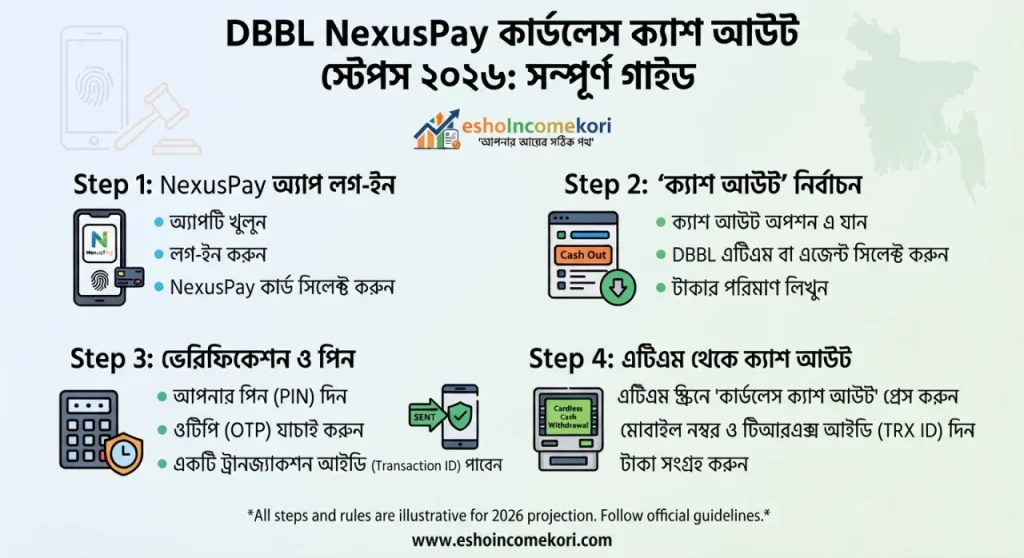
DBBL NexusPay Cardless Cash Out Steps 2026: সম্পূর্ণ গাইড
DBBL NexusPay Cardless Cash Out Steps 2026DBBL NexusPay Cardless Cash Out Steps 2026 জানুন। NexusPay দিয়ে ATM থেকে card ছাড়া cash withdrawal, প্রয়োজনীয় নিয়ম, limit, charge ও security tips বুঝুন।
Introduction Hook
পকেটে ATM card নেই, কিন্তু জরুরি টাকা দরকার। এমন পরিস্থিতিতে কী করবেন? Digital banking technology-এর কারণে এখন কিছু ক্ষেত্রে physical card ছাড়াই ATM থেকে cash withdrawal করার সুবিধা পাওয়া যায়। DBBL-এর NexusPay ecosystem এই ধরনের digital transaction-এর জন্য ব্যবহারকারীদের কাছে গুরুত্বপূর্ণ একটি option।
DBBL NexusPay Cardless Cash Out Steps 2026 জানা থাকলে ATM card সঙ্গে না থাকলেও supported cardless withdrawal facility থাকলে প্রয়োজনীয় cash সংগ্রহ করা সহজ হতে পারে।
তবে cardless cash withdrawal সাধারণ cash withdrawal-এর মতো নয়। এখানে mobile app, authentication, withdrawal code বা অন্যান্য verification process প্রয়োজন হতে পারে। পাশাপাশি ATM compatibility, transaction limit, service charge এবং security rules সম্পর্কেও ধারণা থাকা জরুরি।
এই article-এ NexusPay-এর মাধ্যমে cardless cash withdrawal-এর basic process, eligibility, ATM ব্যবহার, possible charges, limits, failed transaction, security এবং common mistakes সহজভাবে আলোচনা করা হবে।
Quick Summary Table
| বিষয় | তথ্য |
|---|---|
| Service | NexusPay |
| Bank | Dutch-Bangla Bank PLC |
| Withdrawal Type | Cardless cash withdrawal, যেখানে supported |
| ATM | Supported DBBL ATM প্রয়োজন হতে পারে |
| Physical Card | Cardless facility-তে প্রয়োজন নাও হতে পারে |
| Mobile | NexusPay-enabled smartphone প্রয়োজন হতে পারে |
| Authentication | App-based verification/code/other security process |
| Limit | Current service terms অনুযায়ী |
| Charge | Transaction type অনুযায়ী applicable হতে পারে |
| Security | PIN, OTP ও withdrawal information confidential রাখা জরুরি |
NexusPay কী?
NexusPay হলো Dutch-Bangla Bank PLC-এর digital payment platform।
এটি ব্যবহার করে customer বিভিন্ন ধরনের digital financial transaction করতে পারেন, যেমন:
Fund transfer
Payment
Mobile recharge
Merchant payment
Card-related service
Cash withdrawal, যেখানে applicable
NexusPay-এর নির্দিষ্ট features সময়ের সঙ্গে update হতে পারে।
Cardless Cash Out কী?
Cardless cash withdrawal হলো এমন একটি ব্যবস্থা যেখানে physical ATM card ব্যবহার না করেও supported ATM থেকে cash withdrawal করা যায়।
সাধারণ ATM withdrawal-এ প্রয়োজন হয়:
ATM card
PIN
ATM machine
কিন্তু cardless method-এ physical card-এর পরিবর্তে mobile app এবং digital authentication ব্যবহার হতে পারে।
Cardless Cash Out কেন দরকার?
ধরুন আপনি বাসা থেকে বের হওয়ার সময় ATM card নিতে ভুলে গেছেন।
অথবা:
Card হারিয়ে গেছে।
Card temporarily unavailable।
Emergency cash দরকার।
Mobile phone আপনার সঙ্গে আছে।
এই ধরনের পরিস্থিতিতে supported cardless cash withdrawal useful হতে পারে।
DBBL NexusPay Cardless Cash Out কীভাবে কাজ করে?
সাধারণভাবে process-এর মধ্যে থাকতে পারে:
NexusPay app open করা
Cash withdrawal বা applicable cardless service নির্বাচন
Amount দেওয়া
Authentication সম্পন্ন করা
Withdrawal instruction/code পাওয়া
Supported ATM-এ গিয়ে transaction complete করা
তবে app version এবং current DBBL process অনুযায়ী screen বা steps পরিবর্তিত হতে পারে।
Cardless Cash Out করার আগে যা প্রয়োজন
NexusPay account active থাকা প্রয়োজন হতে পারে।
Registered mobile number প্রয়োজন হতে পারে।
Smartphone এবং internet connection দরকার হতে পারে।
Sufficient account balance থাকতে হবে।
Supported ATM ব্যবহার করতে হবে।
Required authentication সম্পন্ন করতে হবে।
Step-by-Step Cardless Cash Out Process
Step ১: NexusPay App Open করুন
আপনার smartphone-এ official NexusPay app খুলুন।
Login বা authentication সম্পন্ন করুন।
কাউকে নিজের login information দেবেন না।
Step ২: Cash Withdrawal Option খুঁজুন
App-এর available services থেকে cash withdrawal বা cardless withdrawal-related option নির্বাচন করুন।
App-এর interface version অনুযায়ী option-এর নাম বা অবস্থান পরিবর্তিত হতে পারে।
Step ৩: Account নির্বাচন করুন
যদি একাধিক account বা funding source linked থাকে, তাহলে যেখান থেকে cash withdrawal করবেন সেটি নির্বাচন করুন।
Step ৪: Withdrawal Amount দিন
আপনি যে amount তুলতে চান সেটি input করুন।
Amount দেওয়ার সময় আপনার available balance এবং applicable withdrawal limit বিবেচনা করুন।
Step ৫: Transaction Details Review করুন
Confirm করার আগে:
Amount
Account
Applicable charge
Withdrawal method
এসব carefully check করুন।
Step ৬: Authentication করুন
NexusPay-এর current security process অনুযায়ী PIN, OTP, biometric বা অন্য authentication method প্রয়োজন হতে পারে।
Authentication information কারও সঙ্গে share করবেন না।
Step ৭: Withdrawal Instruction বা Code
Cardless facility যদি withdrawal code বা transaction reference দেয়, সেটি secure রাখুন।
Code কাউকে দেওয়া উচিত নয়।
Step ৮: Supported DBBL ATM-এ যান
Cardless withdrawal support করে এমন DBBL ATM নির্বাচন করুন।
সব ATM একই service support করবে—এমন ধরে নেওয়া উচিত নয়।
Step ৯: ATM-এর Cardless Option নির্বাচন করুন
ATM screen-এ available cardless withdrawal option থাকলে সেটি নির্বাচন করুন।
Step ১০: প্রয়োজনীয় Information দিন
ATM screen-এ app থেকে পাওয়া applicable information, mobile number, code বা transaction details দিতে হতে পারে।
Step ১১: Authentication Complete করুন
ATM এবং app-এর instructions অনুসরণ করুন।
কোনো step unclear হলে random option নির্বাচন না করে transaction cancel করে official support-এর সাহায্য নিন।
Step ১২: Cash Collect করুন
Transaction successful হলে ATM থেকে cash সংগ্রহ করুন।
Cash নেওয়ার পর:
ATM receipt
Transaction notification
NexusPay transaction history
এসব check করুন।
গুরুত্বপূর্ণ বিষয়: Exact ATM Steps পরিবর্তিত হতে পারে
Digital banking service-এর interface সময়ের সঙ্গে update হয়।
তাই 2026 সালের কোনো নির্দিষ্ট ATM screen-এর screenshot পুরোনো হয়ে যেতে পারে।
NexusPay app এবং ATM-এর বর্তমান on-screen instructions follow করাই সবচেয়ে নিরাপদ।
Cardless Cash Out Limit
Cardless cash withdrawal-এর daily বা per-transaction limit থাকতে পারে।
Limit নির্ভর করতে পারে:
Account type
NexusPay profile
Transaction type
ATM rules
Bank policy
Regulatory requirements
তাই নির্দিষ্ট একটি amount সব customer-এর জন্য প্রযোজ্য ধরে নেওয়া উচিত নয়।
Daily Limit বনাম Per Transaction Limit
দুই ধরনের limit থাকতে পারে।
Per transaction limit: একবারে সর্বোচ্চ কত টাকা তোলা যাবে।
Daily limit: একদিনে সব cardless withdrawals মিলিয়ে সর্বোচ্চ কত টাকা তোলা যাবে।
একটি limit পূরণ করলেই অন্য limit-এর capacity একই থাকবে—এমন নয়।
Cardless Cash Out Charge
Cash withdrawal-এর জন্য applicable service charge থাকতে পারে।
Charge নির্ভর করতে পারে:
Account type
Withdrawal method
Transaction amount
Service category
Current bank tariff
তাই transaction confirm করার আগে app-এ displayed charge দেখুন।
Cash Out করার সময় Balance
শুধু withdrawal amount-এর সমান balance থাকলেই সবসময় যথেষ্ট নাও হতে পারে।
যদি transaction charge applicable হয়, তাহলে:
Withdrawal amount + applicable charge
মিলিয়ে sufficient balance প্রয়োজন হতে পারে।
Example
ধরা যাক আপনার account-এ ৫,০০০ টাকা আছে।
আপনি ৩,০০০ টাকা withdraw করতে চান।
যদি applicable charge থাকে, তাহলে transaction complete করার আগে total debit amount account balance-এর মধ্যে আছে কি না check করুন।
Cardless Withdrawal Failed হলে
Transaction fail হওয়ার কয়েকটি কারণ হতে পারে।
যেমন:
Insufficient balance
Daily limit exceeded
Wrong authentication
Expired withdrawal instruction
ATM unavailable
Network problem
Technical issue
Incorrect information
Service temporarily unavailable
Failed Transaction-এর পর কী করবেন?
প্রথমে transaction status check করুন।
তারপর NexusPay transaction history দেখুন।
যদি amount debit হয়ে যায় কিন্তু cash না পান, transaction details সংরক্ষণ করুন।
ATM location, time এবং transaction reference note করুন।
তারপর DBBL-এর official support channel-এ report করুন।
একই transaction সঙ্গে সঙ্গে বারবার repeat করা উচিত নয়।
Cash না বের হলেও টাকা কেটে গেলে
এটি অত্যন্ত গুরুত্বপূর্ণ situation।
যদি ATM cash না দেয় কিন্তু account থেকে amount debit হয়:
Transaction receipt সংরক্ষণ করুন।
SMS notification রাখুন।
Transaction ID লিখে রাখুন।
ATM location note করুন।
সময় ও date note করুন।
Bank-এর official complaint/support channel-এ যোগাযোগ করুন।
Reversal বা adjustment process bank-এর investigation অনুযায়ী হতে পারে।
ATM-এ Cash না থাকলে
কোনো ATM-এ পর্যাপ্ত cash না থাকলে cardless withdrawal unsuccessful হতে পারে।
এক্ষেত্রে অন্য supported ATM ব্যবহার করা যেতে পারে।
তবে একই transaction code reusable কি না তা current service terms-এর ওপর নির্ভর করতে পারে।
Withdrawal Code Security
যদি cardless transaction-এর জন্য code বা reference number দেওয়া হয়, সেটি password-এর মতো confidential রাখুন।
Code share করলে অন্য ব্যক্তি unauthorized withdrawal করার চেষ্টা করতে পারে।
Screenshot রাখা উচিত?
Withdrawal code বা sensitive information-এর screenshot cloud gallery বা social media-তে রাখা নিরাপদ নয়।
প্রয়োজনে transaction details secure manner-এ রাখুন।
NexusPay PIN Security
PIN কখনো:
বন্ধুকে
পরিবারের সদস্যকে
অপরিচিত ব্যক্তি
fake customer care agent
দেবেন না।
Bank employee পরিচয় দিলেও sensitive authentication information share করবেন না।
OTP Security
OTP transaction authentication-এর জন্য ব্যবহৃত হতে পারে।
কেউ phone করে OTP চাইলে সেটি share করবেন না।
নিজে transaction initiate না করলে কোনো OTP ব্যবহার করবেন না।
Fake NexusPay Support
Fraudsterরা customer support পরিচয় দিয়ে information চাইতে পারে।
তারা বলতে পারে:
“Account verify করতে হবে।”
“Cardless cash-out activate করতে হবে।”
“Cashback পেতে OTP দিন।”
“Account unlock করতে PIN দিন।”
এ ধরনের request থেকে সতর্ক থাকুন।
Public Wi-Fi ব্যবহার
Cardless withdrawal initiate করার সময় public Wi-Fi ব্যবহার না করাই ভালো।
নিজের mobile data বা trusted network ব্যবহার করুন।
Phone হারিয়ে গেলে
যে smartphone-এ NexusPay account logged in থাকে সেটি হারিয়ে গেলে দ্রুত account security ব্যবস্থা নিন।
Mobile SIM security-ও গুরুত্বপূর্ণ।
প্রয়োজনে bank-এর official support-এ যোগাযোগ করুন।
Cardless Cash Out বনাম Card Withdrawal
| বিষয় | Cardless Cash Out | ATM Card Withdrawal |
|---|---|---|
| Physical Card | প্রয়োজন নাও হতে পারে | প্রয়োজন |
| Smartphone | সাধারণত প্রয়োজন | প্রয়োজন নাও হতে পারে |
| App | প্রয়োজন হতে পারে | সাধারণত প্রয়োজন নেই |
| PIN | Digital authentication থাকতে পারে | ATM PIN |
| ATM | Supported ATM | Compatible ATM |
| Convenience | Card না থাকলে বেশি | Card থাকলে সহজ |
| Security | App/code-based | Card/PIN-based |
NexusPay বনাম Mobile Wallet Cash Out
Mobile wallet cash out এবং bank account-based cardless withdrawal এক জিনিস নয়।
Mobile wallet-এর ক্ষেত্রে agent বা wallet-supported service ব্যবহার হতে পারে।
অন্যদিকে bank cardless withdrawal সাধারণত bank account এবং supported ATM-এর সঙ্গে সম্পর্কিত।
Studentদের জন্য Cardless Cash Out
Studentদের জন্য cardless cash withdrawal useful হতে পারে।
যেমন:
University campus-এ card ভুলে যাওয়া
Emergency cash প্রয়োজন
ATM card unavailable
Family থেকে account-এ টাকা আসার পর cash প্রয়োজন
তবে student account-এর specific transaction limits প্রযোজ্য হতে পারে।
Freelancers-এর জন্য ব্যবহার
Freelancerরা bank account-এ payment পাওয়ার পর প্রয়োজন অনুযায়ী cash withdrawal করতে পারেন।
তবে business income-এর ক্ষেত্রে transaction records সংরক্ষণ করা ভালো।
Business Users-এর জন্য
Business account থেকে cash withdrawal করলে accounting records maintain করা গুরুত্বপূর্ণ।
Cash withdrawal-এর:
Date
Amount
Purpose
Transaction reference
সংরক্ষণ করলে bookkeeping সহজ হয়।
Common Mistakes
ভুল withdrawal amount দেওয়া।
Daily limit check না করা।
Insufficient balance থাকা।
Unsupported ATM ব্যবহার করা।
Withdrawal code অন্যকে দেওয়া।
OTP share করা।
PIN share করা।
Transaction status check না করা।
Cash না পেলেও আবার transaction initiate করা।
Debit হয়েছে কি না verify না করা।
Expert Tips
Cardless withdrawal করার আগে account balance check করুন।
App-এর latest version ব্যবহার করুন।
ATM-এ transaction করার সময় screen instructions carefully follow করুন।
Withdrawal code থাকলে confidential রাখুন।
Transaction reference সংরক্ষণ করুন।
Cash নেওয়ার পর ATM area থেকে সরে যাওয়ার আগে receipt check করুন।
Cash না বের হলে account status verify করুন।
Unauthorized transaction দেখলে দ্রুত report করুন।
Public Wi-Fi এড়িয়ে চলুন।
কোনো phone caller-কে PIN বা OTP দেবেন না।
Pros and Cons
সুবিধা
Physical ATM card ছাড়াই cash withdrawal করা যেতে পারে।
Emergency situation-এ useful হতে পারে।
Mobile-based authentication ব্যবহার করা যায়।
ATM card carry করার dependency কমে।
Digital transaction history পাওয়া যায়।
অসুবিধা
Smartphone প্রয়োজন হতে পারে।
Internet বা network dependency থাকতে পারে।
সব ATM একই cardless service support নাও করতে পারে।
Daily বা per-transaction limit থাকতে পারে।
Technical problem হলে transaction fail হতে পারে।
Authentication information নিরাপদ রাখা অত্যন্ত গুরুত্বপূর্ণ।
আরো পড়ুন
- অনলাইন লোন সার্ভিস দিয়ে ইনকাম Incomeকরুন
- এফিলিয়েট Affiliate এবং ব্লগিং মার্কেটিং এর জন্যে কাজের ১০টি টুলস
- কিভাবে মাত্র ৫ মিনিটে logo লোগো তৈরি করবেন? ফ্রি লোগো ডিজাইন
- ফাইন্যান্স ও বিজনেস ব্লগ লিখে ইনকাম Income করুন
- স্ক্রিল Skrill– অর্থ লেনদেনের সহজ ও নিরাপদ পদ্ধতি
FAQ
DBBL NexusPay কী?
NexusPay হলো Dutch-Bangla Bank PLC-এর digital payment platform, যার মাধ্যমে বিভিন্ন banking ও payment-related service ব্যবহার করা যায়।
NexusPay দিয়ে cardless cash withdrawal করা যায়?
যদি আপনার account এবং current NexusPay service cardless cash withdrawal support করে, তাহলে supported DBBL ATM-এ physical card ছাড়াই withdrawal করা যেতে পারে।
Cardless cash withdrawal-এর জন্য ATM card লাগে?
Cardless facility ব্যবহার করলে সাধারণত physical ATM card প্রয়োজন হয় না।
NexusPay cardless cash withdrawal-এর জন্য smartphone দরকার?
সাধারণত app-based cardless transaction initiate করার জন্য smartphone প্রয়োজন হতে পারে।
Cardless cash withdrawal-এর জন্য internet লাগে?
Transaction initiate এবং authentication-এর জন্য internet/mobile connectivity প্রয়োজন হতে পারে।
সব DBBL ATM-এ cardless cash withdrawal করা যায়?
সব ATM একই service support করবে এমন নয়। Supported ATM এবং current NexusPay instructions অনুসরণ করুন।
Cardless cash withdrawal limit কত?
Limit account, service, customer profile এবং current DBBL policy অনুযায়ী পরিবর্তিত হতে পারে।
Cardless cash withdrawal-এর charge কত?
Applicable charge transaction type এবং current bank tariff অনুযায়ী পরিবর্তিত হতে পারে।
Cash না বের হয়ে টাকা কেটে গেলে কী করব?
Transaction reference, ATM location, time এবং debit notification সংরক্ষণ করে DBBL-এর official support channel-এ অভিযোগ করুন।
Withdrawal code কাউকে দেওয়া যাবে?
না। Withdrawal code বা transaction authentication information confidential রাখতে হবে।
NexusPay PIN share করা যাবে?
না। PIN কাউকে দেওয়া উচিত নয়।
OTP share করা যাবে?
না। OTP কখনো অন্য ব্যক্তির সঙ্গে share করবেন না।
Card ছাড়া ATM থেকে টাকা তোলা নিরাপদ?
সঠিক authentication এবং security practices অনুসরণ করলে cardless withdrawal convenient হতে পারে। তবে code, PIN ও OTP সুরক্ষিত রাখা অত্যন্ত গুরুত্বপূর্ণ।
Cardless cash withdrawal fail হওয়ার কারণ কী?
Insufficient balance, transaction limit, wrong authentication, ATM availability, network problem বা technical issue-এর কারণে transaction fail হতে পারে।
Cardless withdrawal-এর আগে কী check করব?
Balance, withdrawal limit, applicable charge, ATM availability এবং app transaction details check করুন।
Cardless cash withdrawal কি সব account-এর জন্য available?
Service availability account type, customer eligibility এবং current NexusPay features-এর ওপর নির্ভর করতে পারে।
Transaction history কোথায় দেখা যায়?
NexusPay-এর transaction history বা সংশ্লিষ্ট bank account statement-এ transaction details দেখা যেতে পারে।
Phone হারিয়ে গেলে কী করব?
দ্রুত mobile account security নিশ্চিত করুন এবং প্রয়োজন হলে DBBL-এর official support-এর সঙ্গে যোগাযোগ করুন।
NexusPay app update করা প্রয়োজন?
Security এবং latest features ব্যবহারের জন্য official source থেকে current app version ব্যবহার করা ভালো।
Cardless cash withdrawal এবং normal ATM withdrawal কি একই?
দুটির উদ্দেশ্য একই হলেও process আলাদা। Normal withdrawal-এ physical card ব্যবহার হয়, আর cardless withdrawal-এ app বা digital authentication ব্যবহৃত হতে পারে।
Conclusion
DBBL NexusPay Cardless Cash Out Steps 2026 জানা থাকলে physical ATM card সঙ্গে না থাকলেও supported cardless facility ব্যবহার করে cash withdrawal করার সুযোগ পাওয়া যেতে পারে।
তবে exact process NexusPay app version এবং DBBL-এর current service configuration অনুযায়ী পরিবর্তিত হতে পারে। তাই app-এর current instructions অনুসরণ করাই সবচেয়ে ভালো।
Cardless withdrawal করার আগে account balance, applicable limit এবং charges check করুন। ATM-এ transaction করার সময় amount ও account information carefully verify করুন। যদি withdrawal code বা authentication information দেওয়া হয়, সেটি কখনো অন্যের সঙ্গে share করবেন না।
সবচেয়ে গুরুত্বপূর্ণ বিষয় হলো transaction সফল হয়েছে কি না তা app বা SMS notification থেকে verify করা। ATM cash না দিলেও account থেকে টাকা debit হলে transaction reference, ATM location এবং সময় সংরক্ষণ করে দ্রুত official DBBL support channel-এ যোগাযোগ করুন।
2026 সালে digital banking services দ্রুত পরিবর্তিত হচ্ছে। তাই পুরোনো tutorial বা social media information-এর ওপর নির্ভর না করে NexusPay app এবং Dutch-Bangla Bank PLC-এর সর্বশেষ official instructions, limits ও charges যাচাই করে cardless cash withdrawal করা সবচেয়ে নিরাপদ পদ্ধতি।